World Cartogram Screensaver
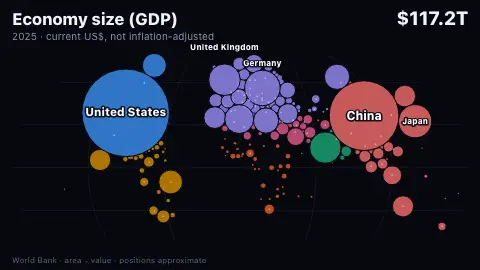
The Morphing World is a free Dorling-cartogram screensaver. Every country is a circle placed near its location on a world map, with its area proportional to one measure, and the circles resize and shove each other aside as the measure changes from population to GDP to CO2 and more. It needs no key, and ESC exits.
Live preview
Press ESC to leave fullscreen. Settings are saved in your browser only.
How the The Morphing World screensaver works
A Dorling cartogram replaces each country's shape with a circle whose area stands for a value, so the biggest populations or economies look big whatever their land area. Here the circle starts at an approximate central point for the country, and the points come from the mledoze/countries dataset (the data behind REST Countries, ODbL), fetched once and kept as a small static file. The base map is a Robinson-style projection built from the published Robinson table, linearly interpolated.
The measures come from World Bank indicators: population, GDP in current US dollars and fossil CO2 from the site's existing country series, plus internet users (share online multiplied by population), land area, forest area, military spending, and the numbers of children and people over 65, from a small extra feed. For the 'latest' year each measure uses the newest year that most countries report; a country that has not reported that year uses its own newest figure from up to three years earlier. A country with no figure at all is left out, and the header says how many.
Layout is a live simulation. Every frame each circle is pulled gently back toward its own map position, and any two overlapping circles are pushed apart, the smaller one moving further. To keep that cheap the circles are kept sorted along the x axis and only near neighbours are compared, a few passes a frame. A faint dot marks each country's own position and a thin line leads back from a circle that has been pushed far away.
Circle sizes are rescaled for every measure so the circles cover about the same share of the map, which means areas can be compared between countries within a measure but not between measures. The five largest circles are labelled, with their values, and the header gives the total across the countries shown.
About Dorling cartograms and the data
A circular cartogram, also called a Dorling cartogram after the geographer Danny Dorling, draws each region as a circle whose area is proportional to a value and moves circles apart where they would overlap. That lets a reader compare countries by what matters for the question, such as people or output, without land area dominating. The cost is geography, which is why this saver shows each country's true position as a faint dot.
The measures are World Bank indicators accessed through its open API: population (SP.POP.TOTL), GDP (NY.GDP.MKTP.CD), CO2 emissions (EN.GHG.CO2.MT.CE.AR5), internet use (IT.NET.USER.ZS), land and forest area (AG.LND.TOTL.K2, AG.LND.FRST.K2), military spending (MS.MIL.XPND.CD, from SIPRI) and population by age (SP.POP.0014.TO, SP.POP.65UP.TO, from the UN Population Division). Positions come from the mledoze/countries dataset on GitHub, licensed ODbL.
What it does not show: anything about who within a country holds the value, any change over time within a view, or countries the World Bank does not list. Some measures, such as military spending and internet use, have noticeably fewer countries than population does, and the number left out is printed in the header.
A worked example
In the 2024 CO₂ view, China's circle holds 13.1 gigatonnes of the 38.0 Gt total across the 201 countries with data, about 35% of the area; the United States holds 4.6 Gt (12%) and India 3.2 Gt (8.3%). In the 2025 GDP view the United States is $30.8 trillion, about 26% of the $117.2 trillion shown, and China $19.5 trillion, about 17%. Russia's land area, 16.4 million square kilometres, makes it the biggest circle in the land view. The US GDP, China's CO₂ and Russia's land area were checked against the World Bank API.
Settings & tips
- Measure holds one measure still, or Cycle morphs through all nine in turn.
- Year picks the latest figures or a fixed year (2020, 2010, 2000, 1990). Some measures have fewer countries in earlier years, and the header says how many are left out.
- Speed sets how long each measure stays on screen.
- Press ESC to leave fullscreen.
Frequently asked questions
- Why are the countries not where I expect them?
- Because a cartogram trades geography for size. Big circles push their neighbours aside and small countries crowd together, so positions are only approximate. The faint dot is each country's own position and the thin line leads back to it.
- Are the circle sizes exact?
- Within one measure, yes: a circle with twice the area stands for twice the value. Between measures they are not comparable, because the picture is rescaled each time. Circles smaller than about a pixel are not drawn.
- Where do the positions come from?
- From the mledoze/countries dataset, which gives a representative latitude and longitude for each country and territory. They are curated central points rather than exact polygon centroids, so a long country such as Chile or Norway is anchored at its middle, not its capital.
- Why are some countries missing?
- A country is left out of a measure and year when the World Bank has no figure for it within three years of the reference year. Two entries in the World Bank list, the Channel Islands and Kosovo, have no map position in the dataset and are never drawn. The header says how many countries are shown and how many are left out.
- Is the projection accurate?
- It is a Robinson-style projection made from the published table values with straight-line interpolation. Like any world map it distorts shapes and areas, especially near the poles; here it only provides a canvas to place the circles on.
- Are GDP figures adjusted for inflation or exchange rates?
- No. GDP is in current US dollars at that year's exchange rate, so it is the headline size of an economy and not a measure of what people can buy. CO2 excludes land use and forest change.
- Why do People 65+ and Children stop at 2023?
- Those age totals come from the UN's World Population Prospects through the World Bank, whose estimates end in 2023 under the 2024 revision. Later years are projections, so the saver leaves them out.
- Why does the 1990 internet view look so sparse?
- Because few countries reported internet use in 1990 and the early figures are coarse, often rounded to a tenth of a percent of the population. The header says how many countries have a figure; the view is real but thin.