World Clock Screensaver
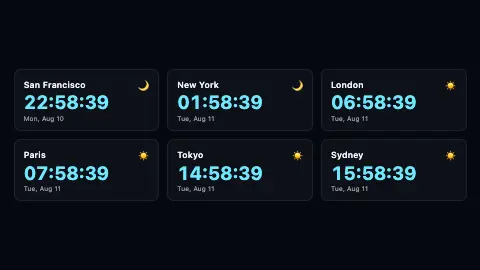
The World Clock screensaver shows the current local time in cities around the world at once, each on its own card. It reads your device's clock and converts it into each city's time zone, so every reading is accurate. It runs free in your browser with no download, and ESC exits.
Live preview
Press ESC to leave fullscreen. Settings are saved in your browser only.
How the World Clock screensaver works
Each city is one card listing its name, a big time readout and the local date. The saver reads new Date() once a second, then uses the browser's Intl.DateTimeFormat with each card's IANA time zone to convert that single moment into local time.
Because the conversion is done by the time-zone database, it handles daylight saving changes automatically - you do not set offsets, you name a zone like Europe/London or Asia/Tokyo.
A small sun or moon icon sits on each card. The saver checks the local hour in that zone and shows a sun between 6am and 6pm, otherwise a moon, so you can see at a glance who is awake.
The cities are read from a comma-separated Cities list of City|TimeZone pairs, and the cards lay out in a grid up to three across so several zones fit on screen together.
Time zones, UTC and the IANA database
Civil time worldwide is defined as an offset from Coordinated Universal Time, or UTC. Offsets are not all whole hours: some places sit half an hour or 45 minutes off their neighbours. Governments also change their rules, so a country can abolish daylight saving, shift its zone, or move the changeover dates.
To keep up, most software relies on the tz database, also called zoneinfo and hosted by IANA. It holds code and data describing the history of local time for many representative places, and is revised periodically to track government changes to time zone borders, UTC offsets and daylight saving schedules. Zones are named after places, such as Europe/London.
This explains why city labels rather than raw offsets are the dependable way to name a clock. Two cities with the same offset today may differ at another time of year, or may have differed in the past. It also means software with an outdated copy of the database can show a wrong time for a place whose rules changed recently, until it is updated. Most end users receive these updates through their software or operating system vendors.
A worked example
Settings & tips
- Edit the Cities field as City|TimeZone pairs, like Berlin|Europe/Berlin, to track exactly the zones you care about.
- Switch Hour format to 12-hour for AM/PM cards, or turn off seconds for a calmer board.
- Use the Accent control to set the color of the large time figures on every card.
Frequently asked questions
- Does the world clock handle daylight saving time?
- Yes. It uses the browser's time-zone database, so each city's offset and daylight-saving changes are applied automatically. You name a zone like Europe/London rather than setting offsets by hand.
- Can I choose which cities the world clock shows?
- Yes. Edit the Cities field as a comma-separated list of City|TimeZone pairs, such as Tokyo|Asia/Tokyo. The cards lay out in a grid up to three across.
- Is the world clock screensaver accurate?
- Yes. It reads your device's clock once a second and converts that one moment into each city's local time. Every card is as accurate as your own computer's clock.
- What do the sun and moon icons mean?
- They show whether it is day or night in each city. The saver shows a sun when the local hour is between 6am and 6pm, and a moon otherwise.
- Is the world clock screensaver free?
- Yes. It runs entirely in your browser with no download or account. Press ESC at any time to exit full screen.
- Why do some cities differ by 30 or 45 minutes?
- Offsets from UTC are set by governments, and a few places use half-hour or 45-minute offsets rather than whole hours.
- What is the tz database?
- It is a collection of code and data describing the history of local time for many representative places, revised periodically to track changes to offsets and daylight saving rules. It is also known as zoneinfo.
- Why do the clocks of two cities sometimes disagree about the date?
- Time zones are spread across the globe, so when it is late evening in one place it can already be the next calendar date in another.