Fake Blue Screen of Death Screensaver
This is a free, harmless fake Blue Screen of Death (BSOD) prank that runs entirely in your web browser. It paints a pixel-perfect Windows crash screen, but nothing is actually wrong and no files or settings are touched. It is just an image made of pixels, so nothing is downloaded or installed. Press ESC at any time to exit instantly.
Live preview
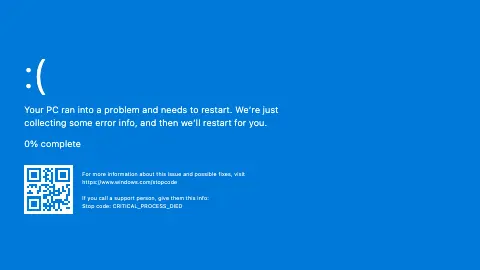
Press ESC to leave fullscreen. Settings are saved in your browser only.
How the Blue Screen of Death screensaver works
The saver fills the screen with a full Windows crash layout in your chosen Era. The default Windows 10/11 style draws the giant sad face :(, your typed message, a "% complete" line, and the familiar windows.com/stopcode support text alongside your stop code.
The classic Windows XP and Windows 9x (text) eras swap in monospaced blue text walls instead — the "A problem has been detected" wall with a fake STOP address, or the centered "A fatal exception has occurred" screen with a blinking underscore cursor.
When Animate % complete is on, the percentage ticks upward at random and loops back to zero, so the screen looks like it is forever "collecting error info" without ever finishing. With it off, it simply sits at 100%.
In the Windows 10/11 era, the optional Show QR code draws a procedurally generated square QR block from your stop code text — purely decorative, it does not link anywhere. Everything is plain HTML and CSS; nothing runs in the background.
A famous failure screen
The blue screen, which Microsoft documents as a bug check or stop code error, appears when Windows encounters a condition that compromises safe system operation, so it halts. The cause can be a hardware device, its driver or related software. If the system were allowed to carry on, data could be corrupted or security compromised. If crash dumps are enabled, Windows writes a crash dump file, and the screen shows a percent-complete figure while it does.
The screen shows a stop code, and when it is available, the name of the module that was running. Technicians use the code to trace the cause. On Windows 10 the screen includes a QR code, and its layout varies between versions of Windows.
The look became so familiar that it turned into a cultural joke. Microsoft’s Sysinternals site offers BlueScreen, a screen saver by Mark Russinovich published in 2006 that imitates crash screens using real details from the computer it runs on. This page is simply a picture. It is not a crash, nothing on the device is damaged, and it does not run any diagnostic. Because it can alarm colleagues, use it only where the audience is in on the joke.
A worked example
Leave the Era on Windows 10/11, keep the default message and the stop code CRITICAL_PROCESS_DIED, then turn Animate % complete on and leave Show QR code on. You get the modern blue sad-face crash with a percentage that climbs and resets forever and a decorative QR square — a convincing "my PC just died" desk prank that vanishes the moment someone hits ESC.
Settings & tips
- Switch the Era to Windows 9x (text) for the old-school all-text blue wall, or Windows XP for the monospaced STOP screen.
- Type a custom Stop code like MEMORY_MANAGEMENT or your own joke code — it appears in the support text and reshapes the decorative QR.
- Turn off Animate % complete if you want the screen frozen at 100% instead of an endlessly looping counter.
Frequently asked questions
- Will this fake Blue Screen of Death harm my computer?
- No. It is only colored pixels drawn on a web page and changes nothing on your machine. No files, settings, or system processes are touched, and nothing is downloaded or installed.
- How do I exit the fake BSOD screen?
- Press the ESC key and the crash screen closes instantly. You return to the normal page right away with nothing changed.
- Is the fake Blue Screen of Death free?
- Yes, it is completely free and runs in your browser. There is no download, no sign-up, and no software to install.
- Can I write my own error message and stop code?
- Yes. There is a message box and a stop code field, so you can type any text you like. Your words appear right on the fake crash screen.
- Does it work like a real Windows crash?
- It only looks like one. It mimics the Windows 10/11, XP, and 9x crash screens visually but performs no real crash and runs no system code.
- What does a stop code actually mean?
- It identifies the bug check that halted Windows, such as a driver or hardware fault. Microsoft publishes a bug check code reference, and support staff search the code to find a likely cause.
- Why does Windows stop instead of carrying on?
- Microsoft explains that if the system kept running after its integrity was compromised, data could be corrupted or security undermined. Halting is a protective measure.
- Is there a legitimate version of this screensaver?
- Yes. Sysinternals BlueScreen, written by Mark Russinovich, imitates the crash screen, so the idea is not unique to this site.