Fake Mac Kernel Panic Screensaver
This is a free, harmless fake Mac kernel panic screen that runs entirely in your web browser. It recreates the translucent gray "You need to restart your computer" overlay with the power glyph, but your Mac is completely fine and nothing is actually crashing. It is only pixels on a page, so nothing is downloaded or installed. Press ESC at any time to exit instantly.
Live preview
Press ESC to leave fullscreen. Settings are saved in your browser only.
How the Mac Kernel Panic screensaver works
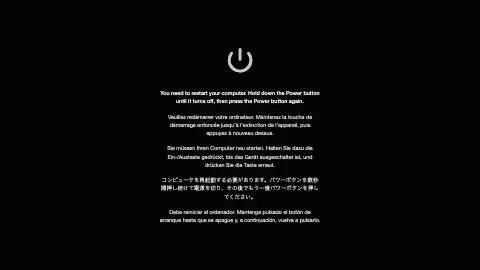
The saver darkens the screen with a black backdrop and a semi-transparent dim layer, then centers the pulsing power ⏻ glyph above the calm "You need to restart your computer" instruction — exactly the overlay macOS shows after a real panic.
With Multiple languages on, it stacks the same instruction in English, French, German, Japanese, and Spanish, mirroring Apple's real multilingual panic notice. The first line is bold and the rest sit slightly dimmed beneath it.
Turn Multiple languages off and only the English line shows, rendered a little larger and on its own for a cleaner look.
The power glyph gently glows in and out on a slow loop, and the Backdrop dim slider controls how dark the layer behind the text appears. It is all static HTML and CSS with one looping animation — nothing runs in the background.
What a real kernel panic is
A kernel panic is a safety measure an operating system's kernel takes when it detects an internal fatal error it cannot safely recover from. The kernel manages memory, processes and hardware, so carrying on after such an error risks damaging data. The panic routine typically prints an error message, may dump kernel memory to disk for debugging, and then waits for a manual reboot or restarts automatically.
The term is mainly used for Unix and Unix-like systems, including Linux, and macOS inherited it from that lineage. Windows calls the equivalent a stop error, often known as the blue screen of death. Causes include faulty RAM or other hardware failures, bugs in the operating system, missing or incompatible drivers and add-on hardware, and incorrectly configured kernels.
Mac OS X 10.2 through 10.7 showed a multilingual message telling the user to restart, which is the look this saver imitates. From OS X 10.8 the Mac instead restarts automatically and shows a brief message afterwards. What you see here is a mock-up for amusement and has no connection to your computer's health.
A worked example
Keep Multiple languages on and set Backdrop dim to 75%. You get the full Apple-style panic overlay: a softly pulsing power symbol over the bold English "You need to restart your computer" line, with French, German, Japanese, and Spanish stacked underneath on a dark gray wash — the classic Mac scare that disappears the second someone presses ESC.
Settings & tips
- Toggle Multiple languages off for a single, larger English-only instruction line.
- Push Backdrop dim toward 95% for a near-black, ominous backdrop, or down to 40% for a lighter, more transparent overlay.
- Pair it with the matching desktop wallpaper before walking away so the "frozen Mac" gag looks even more convincing.
Frequently asked questions
- Will this fake kernel panic harm my Mac?
- No. It is just pixels drawn on a web page and changes nothing on your computer. No files or settings are touched, and nothing is downloaded or installed.
- How do I exit the fake kernel panic screen?
- Press the ESC key and the overlay closes immediately. Your Mac was never actually affected, so you return to normal at once.
- Is the fake Mac kernel panic free?
- Yes, it is completely free and runs in your browser. There is no download, no account, and nothing to install.
- Why does the message appear in several languages?
- Real macOS kernel panics show the restart instruction in multiple languages, so the saver copies that. You can turn the extra languages off with the Multiple languages toggle.
- Does this actually crash my computer?
- No. It only displays the gray panic overlay as a picture. Nothing crashes, and no system process or restart is triggered.
- What usually causes a real kernel panic?
- Hardware failures such as faulty memory, operating system bugs, and missing or incompatible drivers or add-on hardware are among the causes.
- Is a panic the same as a crash of one app?
- No. An app crash affects one program, whereas a kernel panic means the core of the system hit an error it could not safely handle.
- Do other systems have an equivalent?
- Yes. Linux uses the same term, and Windows shows a stop error, commonly known as the blue screen of death.