Fake Excel Spreadsheet Screensaver
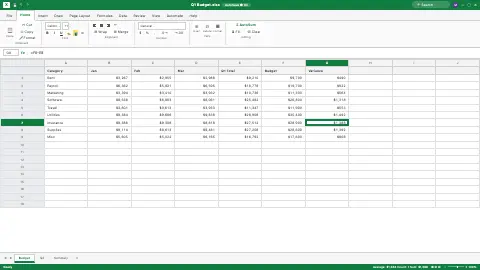
This is a free, harmless fake Excel spreadsheet that runs entirely in your web browser. It renders a convincing Excel window with a cell cursor that wanders the grid and a formula bar that updates, so it looks like real work is happening. Nothing is real and no file, app, or data is touched — it is just pixels on a page with nothing to download or install. Press ESC at any time to exit instantly.
Live preview
Press ESC to leave fullscreen. Settings are saved in your browser only.
How the Fake Spreadsheet screensaver works
The saver draws a full Excel-style window: the green title bar, the File / Home / Insert ribbon, the cell-reference box and fx formula bar, a lettered-and-numbered grid, and worksheet tabs along the bottom. The numbers are randomly generated each time it loads.
Your chosen Spreadsheet sets the content. Budget fills a Q1 budget with category, monthly, total, budget, and variance columns; Sales report shows products with quarterly figures and a growth percentage; Inventory lists SKUs, quantities, values, and OK/REORDER status.
A green cell cursor jumps to a random cell about once a second, outlining and highlighting it just like clicking around a sheet. The cell-reference box updates to that cell's address and the formula bar shows its contents.
When a numeric cell is selected, the status bar at the bottom fills in a fake "Sum / Count / Avg" readout, exactly like Excel's selection summary. It is all static HTML and CSS with one timer moving the highlight — nothing runs in the background.
The spreadsheet as office furniture
The spreadsheet grid is older than most office software. VisiCalc, conceived by Dan Bricklin and developed with Bob Frankston at Software Arts, was released for the Apple II in October 1979 and is often called the first killer application for personal computers, helping turn microcomputers into business tools. Microsoft Excel went on sale in September 1985 for the Macintosh, and the first Windows version followed in November 1987. Its layout of lettered columns and numbered rows became a visual shorthand for office work.
Details of the grid are quirky. Columns run A to Z and then AA, AB and onward, a base-26 system with no zero, so the column after Z is AA. Excel from version 12.0 (Excel 2007) onward supports 1,048,576 rows and 16,384 columns, the last labelled XFD, though almost no one uses them; earlier versions had 65,536 rows and 256 columns. Cell references such as B7 in a formula are a central idea of spreadsheets, because changing one value recalculates every cell that depends on it.
This page is a prop. It paints a look-alike window and does not open your files, read your data or talk to Microsoft, and the numbers in it are made up. Excel is a trademark of Microsoft, which is not connected with this site.
A worked example
Set Spreadsheet to Budget and walk away. The screen shows a "Q1 Budget.xlsx" workbook full of plausible category figures and variance numbers, while a green selection box hops from cell to cell, the A1-style reference box and formula bar keep updating, and the status bar flashes Sum / Count / Avg — so from across the room it looks like you're deep in the numbers. Press ESC and it's gone instantly.
Settings & tips
- Switch the Spreadsheet to Sales report for a product revenue table, or Inventory for a stock list with REORDER flags.
- Reload the page to regenerate fresh random numbers if you want a different-looking sheet.
- Use it as a "looking busy" prank screen during a break — the roaming cursor sells the illusion that work is happening.
Frequently asked questions
- Will this fake spreadsheet harm my computer?
- No. It is just a picture of a spreadsheet drawn on a web page and changes nothing on your machine. No file is opened, edited, or saved, and nothing is downloaded.
- Is this real Excel or my actual files?
- Neither. It is a lookalike built from random sample data, not Microsoft Excel and not any file of yours. None of the numbers are connected to anything real.
- How do I exit the fake spreadsheet?
- Press the ESC key and the fake Excel window closes instantly. You return to the normal page with nothing changed.
- Is the fake Excel spreadsheet free?
- Yes, it is completely free and runs in your browser. There is no download, no sign-up, and nothing to install.
- Can I choose what kind of spreadsheet shows?
- Yes. The Spreadsheet control lets you pick Budget, Sales report, or Inventory. Each loads a different set of randomly generated figures.
- Why do spreadsheet columns go from Z to AA?
- Column labels use letters as digits, but there is no zero letter, so after Z comes AA. Mathematicians call this bijective base-26 numeration.
- Who invented the spreadsheet?
- Dan Bricklin conceived VisiCalc and, with Bob Frankston, developed it at Software Arts for the Apple II. It is widely regarded as the first widely used electronic spreadsheet.
- How many rows does real Excel have?
- Current versions support 1,048,576 rows and 16,384 columns per worksheet. Excel 2003 and earlier were limited to 65,536 rows and 256 columns.