SMPTE Color Bars Screensaver
The SMPTE Color Bars screensaver recreates the classic SMPTE broadcast color-bar calibration pattern used by television stations for decades. It is free, runs in your browser, and ESC exits.
Live preview
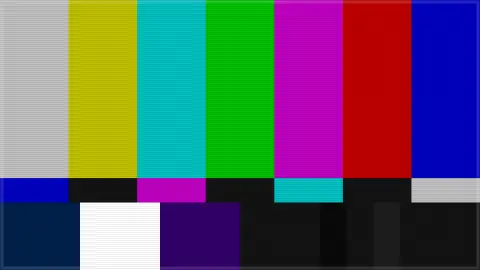
Press ESC to leave fullscreen. Settings are saved in your browser only.
How the SMPTE Color Bars screensaver works
The saver draws the real, standardized SMPTE color-bar layout — white, yellow, cyan, green, magenta, red, blue and black bands.
A subtle scanline overlay and gentle flicker give it an authentic analog-broadcast feel.
The pattern is static by design, with only a gentle animation to avoid burn-in on modern displays.
This recreates a real, well-documented broadcast engineering standard.
Reading the SMPTE color-bar test pattern
Color bars were created so that a television signal could be checked at a glance. Broadcasters send the pattern, often with a 1,000 Hz tone, and record it at the start of tapes, so receiving stations and playback equipment can be adjusted to match a known reference. The SMPTE pattern was designed for analog NTSC video, and it is still used in digital facilities to keep luminance and chroma consistent across displays and transmission systems.
The upper two-thirds holds seven bars at 75% intensity, from white or grey through yellow, cyan, green, magenta, red and blue. This order matters because on a waveform monitor in luminance mode the bars step down like a staircase, and on a vectorscope each bar’s trace should land in a marked box. Lower down, a PLUGE pulse (Picture Line-Up Generation Equipment) sits inside a black rectangle as three small bars, slightly below black, at black, and slightly above it. When a monitor’s black level is set correctly, the brightest of the three is just barely visible and the other two look identical.
Variants exist. An extended pattern developed in Japan by ARIB, standardized as SMPTE RP 219 for 16:9 HDTV, has slower transitions that make level and color adjustment easier, and later revisions cover UHD and HDR, so not every set of bars looks alike.
A worked example
The familiar band of colors sits steady on screen, exactly as generations of TV engineers used it to calibrate broadcast equipment.
Settings & tips
- Accent tints the scanline overlay.
- Based on the real, standardized SMPTE color-bar broadcast pattern.
- A gentle animation avoids static burn-in on modern displays.
Frequently asked questions
- Is this a real broadcast standard?
- Yes — the real SMPTE color-bar pattern used by broadcast engineers for decades.
- Is a key needed?
- No — it is a pure visual pattern.
- Is it free?
- Yes — free, no download, in your browser.
- Will it burn in on my screen?
- The pattern gently animates specifically to avoid that.
- Why are the bars arranged in that order?
- They descend in brightness, so on a waveform monitor they form a regular staircase, and each bar’s color falls at a known position on a vectorscope, which makes checking quick.
- What is PLUGE?
- Picture Line-Up Generation Equipment. It is a pulse of three small bars around black level, used to set a monitor’s black level so that the rightmost bar is just barely visible while the two on the left look identical and fully black.
- Can I calibrate my display with this saver?
- Not reliably. Proper calibration needs measurement instruments and a known signal path, and a web page passes through display settings and color management that it cannot control.