Device Vitals Board Screensaver
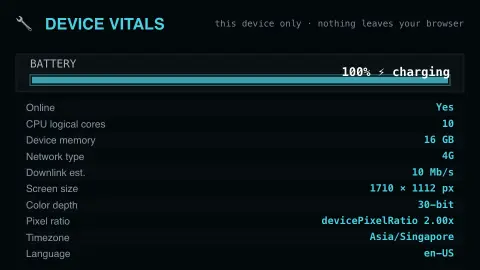
The Device Vitals Board screensaver shows real live stats about your own device — battery, network, CPU cores and display — read directly from your browser. It is free, runs in your browser, and ESC exits.
Live preview
Press ESC to leave fullscreen. Settings are saved in your browser only.
How the Device Vitals Board screensaver works
The saver reads real, live values your browser already exposes: battery level and charging state, network connection type, logical CPU cores, and display resolution.
Metrics update live as they genuinely change — for example, the battery percentage ticks as your real device charges or drains.
Nothing is sent anywhere — every value is read and displayed locally, entirely within your browser.
Not every browser exposes every metric; unsupported ones are clearly labeled as such, never faked.
What a browser can say about your device
Browsers expose only a narrow slice of device information to web pages, and the slice varies by browser. The Battery Status API reports charge level and charging state through navigator.getBattery(), but MDN flags it as not Baseline because it does not work in some of the most widely used browsers, and the W3C specification warns that high-precision readouts can become a fingerprinting vector. The Network Information API offers a rough connection class (effectiveType) and estimates such as downlink and round-trip time; it is a WICG draft rather than a finished standard and is strongest in Chromium-based browsers.
navigator.hardwareConcurrency returns the number of logical processors, not physical cores, so a four-core CPU may report eight. Browsers may also report a lower number, so MDN advises not to treat it as an absolute count of cores. Layout sizes are measured in CSS pixels, and devicePixelRatio is the ratio of physical pixels to CSS pixels, around 2 on Retina-class displays, so a high-density screen has more physical pixels than CSS pixels.
That is why the board can look different from one browser to another, or from what your operating system says. A missing field means the browser does not provide it to the page, not that the hardware lacks the feature. Values describe what the page is permitted to see, so they are approximate and should not be treated as a diagnostic tool.
A worked example
Plug in your charger and the real charging indicator flips live, exactly in step with your device's actual charging state.
Settings & tips
- Accent recolours the live indicator dots.
- Nothing is sent anywhere — all values stay local to your browser.
- Some metrics are Chrome/Edge-only and show as unsupported elsewhere, honestly.
Frequently asked questions
- Does this send my device info anywhere?
- No — every value is read and displayed locally; nothing leaves your browser.
- Why are some fields missing?
- Not every browser exposes every metric (like battery or connection type) — unsupported ones are labeled honestly.
- Is a key needed?
- No — it reads your browser's own built-in device APIs.
- Is it free?
- Yes — free, no download, in your browser.
- Why does my CPU count look larger than my processor's core count?
- The browser reports logical processors, which can outnumber physical cores; MDN gives a four-core CPU offering eight logical processors as an example. Browsers may also report fewer than the true number.
- Why is battery information missing in some browsers?
- The Battery Status API is not supported in some of the most widely used browsers, and its specification warns that precise battery readouts can act as a fingerprinting vector.
- Why do screen sizes not match my display's advertised resolution?
- Pages work in CSS pixels, and devicePixelRatio is the ratio of physical pixels to CSS pixels, so on a high-density screen the physical resolution is larger than the CSS size.