Mystify Screensaver
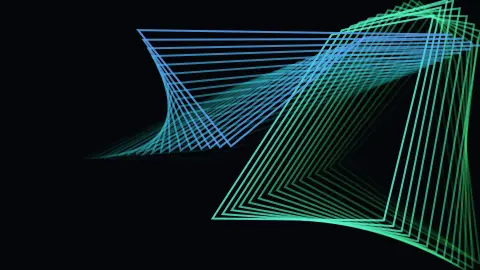
Mystify is a free, browser-based version of the hypnotic Windows screensaver where polygons bounce around the screen, each one dragging a trail of slowly shifting color behind it. Their corners drift independently, so the shapes constantly stretch and reform. Nothing to download — open the page to watch, and press ESC to exit.
Live preview
Press ESC to leave fullscreen. Settings are saved in your browser only.
How the Mystify screensaver works
Each shape is a set of points (set by Points per shape) that each move in a straight line at constant speed and bounce off the four edges of the screen. Because every corner has its own velocity and bounces on its own timing, the polygon that connects them is always warping into new forms — never a rigid spinning shape.
Every frame the current corner positions are pushed onto a history list, and the shape is redrawn once for each remembered frame. The older copies are faded out, which produces the signature ribbon trail chasing the leading polygon. The Trail length control sets how many past frames are kept.
With Rainbow colors on, each shape carries a hue that slowly advances over time, and the trailing copies are offset along the spectrum, so the ribbon shades from one color to the next. Turn rainbow off and it draws in a single fixed Color instead.
Shapes sets how many independent polygons share the screen, Speed scales how fast the corners travel and bounce, and Line thickness controls the stroke width of every outline.
Straight lines that look like curves
The striking thing about Mystify is that every line is straight, yet the picture appears full of curves. This is the envelope effect also seen in string art. When many straight lines are drawn at gradually shifting angles, the eye sees a smooth curve running along the places where nearby lines almost touch, even though no curve was drawn.
The motion adds to the effect. Each corner moves on a straight path and bounces like a billiard ball when it reaches an edge, which means the shape changes in ways that do not quickly repeat. The trailing copies keep the earlier shape visible, so you see the polygon and its recent history together.
The saver is best known from the Windows 3.1 era, when a version called Mystify Your Mind was bundled with Windows, and the style has been copied in many other environments. It is a case of a simple graphic idea, straight lines and bounces, producing a rich picture.
A worked example
At the defaults — Shapes 2, Points per shape 4, Trail length 18, Speed 4, Rainbow colors on — two four-cornered polygons ricochet around the screen, each leaving an 18-frame rainbow ribbon that cycles through hues as it goes. Raise Points per shape to 8 for tangled star-like forms, push Trail length toward 40 for long sweeping ribbons, or turn rainbow off to lock everything to a single chosen color.
Settings & tips
- Increase Trail length for long, sweeping color ribbons, or shorten it for crisp polygons with just a hint of motion blur.
- Add more Shapes and raise Points per shape for busier, more tangled geometry across the screen.
- Turn off Rainbow colors to draw everything in a single fixed Color for a cleaner, more retro look.
Frequently asked questions
- Is the Mystify screensaver free?
- Yes. It runs free in your browser with no download or sign-up. Open the page and the polygons start bouncing right away.
- How do I exit the Mystify screensaver?
- Press the ESC key at any time to close it. Moving the mouse or clicking also returns you to the page.
- Is this the same Mystify from Windows?
- Yes, it recreates the classic Windows Mystify effect — bouncing polygons that trail shifting bands of color — running in your browser.
- Why do the shapes keep changing form?
- Each corner of a shape moves and bounces on its own, so the polygon connecting them constantly stretches and reshapes instead of staying rigid.
- Can I change the colors?
- Yes. Leave Rainbow colors on for cycling hues, or turn it off to draw the shapes in a single color you pick.
- Why do the lines look curved?
- Many straight lines at slowly changing angles crowd along a common boundary, called an envelope. Your eye follows that boundary as a curve.
- Does the shape ever repeat exactly?
- Only if the corner speeds and screen size line up in a very special ratio, which is unlikely, so in practice the pattern keeps changing.
- Why was this saver so popular?
- It looked impressive from very simple rules, and because it was bundled with Windows, a huge number of people saw it.