Fake Word Document Screensaver
This is a free, harmless fake Word document that runs entirely in your web browser. It shows a convincing Microsoft Word window that types out a document on its own, so it looks like you're hard at work. Nothing is real and no file, app, or data is touched — it is only pixels on a page with nothing to download or install. Press ESC at any time to exit instantly.
Live preview
Press ESC to leave fullscreen. Settings are saved in your browser only.
How the Fake Word Doc screensaver works
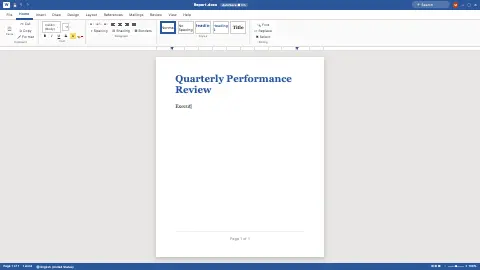
The saver draws a full Word-style window: the blue title bar with a "Saved" label, the File / Home / Insert ribbon, and a white page floating on the gray work area with a drop shadow — the unmistakable Microsoft Word look.
Your chosen Document sets the text. Letter writes a formal business letter, Résumé lays out a product designer's CV, Report types a quarterly performance review, and Lorem ipsum fills the page with classic placeholder text.
The document types itself out character by character with a blinking blue cursor trailing the text, exactly as if someone were writing it live. The Typing speed control sets how fast the characters appear.
When the document finishes, it pauses for a few seconds, then clears and starts typing again from the top in an endless loop. It is all static HTML and CSS with one timer revealing the text — nothing runs in the background.
The long life of the word processor prank
Looking busy at a computer is an old workplace habit, and the fake document is its screen-saver cousin. A page that appears to be typing itself works because people judge activity from a few cues: a recognisable window frame, a blinking cursor and text appearing at human speed. The software does not need to resemble a real file at all.
Microsoft Word first shipped on 25 October 1983 under the name Multi-Tool Word, and by the 1990s, after overtaking WordPerfect, it was the de facto standard word processor. The ribbon that this page imitates arrived much later, in Word 2007. That long familiarity is why a title bar, a toolbar and a white page on a grey background read instantly as office work.
The sample texts mirror ordinary office genres: a formal letter, a CV and a performance report all follow conventions most readers recognise. Lorem ipsum is a corrupted version of passages from Cicero’s De finibus bonorum et malorum, written in the first century BC. The version in use today derives from Letraset transfer sheets of 1966, and it spread among typesetters from the late 1960s. This page is an imitation for entertainment and has no connection with Microsoft.
A worked example
Set Document to Report and leave Typing speed at 5. The screen shows a "Report.docx — Saved" Word window with a serif-styled "Quarterly Performance Review" typing itself out line by line, blue cursor blinking along, then looping forever — so a passing glance reads as genuine, focused work. Press ESC and the whole window vanishes instantly.
Settings & tips
- Switch Document to Letter or Résumé for a more personal-looking page, or Lorem ipsum for neutral filler.
- Lower Typing speed for a slow, deliberate "thinking as I write" effect, or raise it for rapid drafting.
- Pair it with the Fake Spreadsheet on a second screen for a fully convincing "buried in work" desk setup.
Frequently asked questions
- Will this fake Word document harm my computer?
- No. It is just a picture of a Word window drawn on a web page and changes nothing on your machine. No file is opened, edited, or saved, and nothing is downloaded.
- Is this real Microsoft Word or my own files?
- Neither. It is a lookalike that types out built-in sample text, not Microsoft Word and not any document of yours. Nothing you see is connected to a real file.
- How do I exit the fake Word document?
- Press the ESC key and the fake Word window closes instantly. You return to the normal page with nothing changed.
- Is the fake Word document free?
- Yes, it is completely free and runs in your browser. There is no download, no sign-up, and nothing to install.
- Can I pick which document it types?
- Yes. The Document control lets you choose a letter, résumé, report, or lorem ipsum. Each one types out its own preset text.
- Where does lorem ipsum come from?
- It is a scrambled, altered version of passages from Cicero’s De finibus bonorum et malorum, a Latin work of the first century BC. The familiar wording comes from Letraset sheets first published in 1966.
- Is this affiliated with Microsoft?
- No. It is an independent imitation of a word-processor window, not a Microsoft product.
- Why does typing text look so convincing?
- People read activity from cues such as steady pacing, a cursor and growing text, so even generic content reads as someone working.