Binary Clock Screensaver
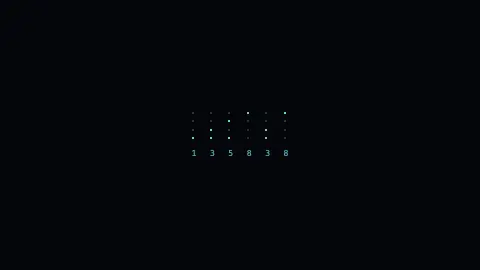
The Binary Clock screensaver shows the time as columns of glowing dots, with each column a digit of the time written in binary-coded decimal. It reads your device's own clock, so the time it encodes is always accurate. It runs free in your browser with no download, and you press ESC to exit.
Live preview
Press ESC to leave fullscreen. Settings are saved in your browser only.
How the Binary Clock screensaver works
The saver reads new Date() twice a second and pads the time to two digits each for hours, minutes and seconds. Each digit gets its own column of four dots, weighted 8, 4, 2 and 1 from top to bottom.
For every column it tests which bits are set using a bitwise AND against those weights. A lit dot fills with your accent color and gains a soft glow; an unlit dot stays a hollow outlined circle, so the pattern is easy to scan.
Showing seconds gives six columns (HH MM SS); turning seconds off drops to four columns for hours and minutes only. A 12-hour format rolls the hour to a 1-to-12 range.
When Show decimal row is on, a small number prints under each column with the digit it encodes, which makes the binary easy to learn and to read at a glance.
Binary-coded decimal and its place in computing
Binary-coded decimal, or BCD, stores each decimal digit separately in its own group of four bits, rather than converting the whole number into one long binary value. The digit 7, for instance, becomes 0111, and 59 becomes 0101 followed by 1001. It wastes some of the range of each group, since four bits can count to 15 but a digit only needs to reach 9, so it is less compact than pure binary.
The trade-off buys convenience. Converting to and from human-readable numbers is simple, and there are no rounding surprises when a value such as a price or a time is displayed, which is why BCD has long been used in calculators, financial hardware, and the real-time clock chips found on many circuit boards. Each digit of the time lives in its own nibble, ready to drive a display with little extra logic.
A clock built around the format needs at most six columns: tens and units of hours, minutes and seconds. The tens digits never need more than two or three bits, which is why some hardware binary clocks leave the topmost dots permanently dark in those columns.
A worked example
Settings & tips
- Keep Show decimal row on while you learn to read it; turn it off for a pure binary display.
- Turn off Show seconds for a calmer four-column clock that updates only on the minute.
- Use the Lit color control to set the glow of the active dots against the dark background.
Frequently asked questions
- How do you read a binary clock?
- Each column is one digit of the time in binary-coded decimal, with dots worth 8, 4, 2 and 1 from top to bottom. Add the lit dots in a column to get that digit. The decimal row below each column shows the answer.
- Is the binary clock screensaver accurate?
- Yes. It reads your device's own clock twice a second and encodes the exact hours, minutes and seconds. No internet connection is needed.
- Can I turn off the decimal numbers?
- Yes. The Show decimal row toggle hides the digit labels under each column for a pure binary display, or shows them so you can learn to read it.
- Can the binary clock show a 12-hour time?
- Yes. Set Hour format to 12-hour and the hour column rolls between 1 and 12 instead of 0 to 23. You can also hide seconds to drop to four columns.
- Is the binary clock screensaver free?
- Yes. It runs entirely in your browser with no download or account. Press ESC whenever you want to exit full screen.
- Why does a tens column need fewer lights?
- Hours never exceed the 20s, and the tens of minutes and seconds stop at 5, so those digits fit in two or three bits and the upper positions can never light.
- Is BCD the same as ordinary binary?
- No. Ordinary binary encodes the whole number as one value, whereas BCD encodes each decimal digit separately, so 59 is two groups of four bits.
- Where would I have met BCD in real hardware?
- It appears in real-time clock chips, calculators, digital meters and some financial systems, wherever exact decimal presentation matters.