Tide Clock Screensaver
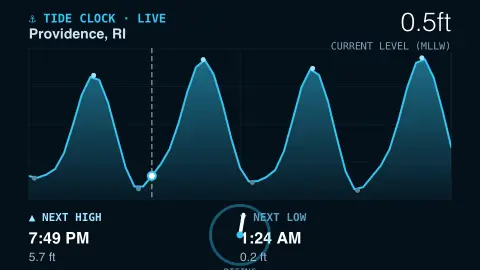
The Tide Clock screensaver tracks the sea rising and falling at a coastal station, drawing a smooth tide curve with the next high and low water times, from the key-less NOAA Tides & Currents API. It's free, runs in your browser, and ESC exits.
Live preview
Press ESC to leave fullscreen. Settings are saved in your browser only.
How the Tide Clock screensaver works
The saver fetches NOAA tide predictions for the station you choose — both the high/low times and an hourly curve over the next couple of days, with no key.
It draws a smooth, water-filled tide curve with a marker at the current moment, interpolated between predictions.
The next high and the next low are called out with their times and heights.
The data refreshes periodically so the “now” marker and upcoming tides stay accurate.
Where tide predictions come from
Tides are caused mainly by the gravitational pull of the Moon and Sun on Earth’s oceans, but the water level at any port is shaped by local factors. The shape of a bay, the depth of the sea floor and the coastline can amplify or damp the tide, which is why the range can be a metre or two on much of the US coast and many metres in a place like the Bay of Fundy.
NOAA, through its Center for Operational Oceanographic Products and Services (CO-OPS), publishes tide predictions for stations around the United States. At harmonic stations, predictions come from tidal harmonic constituents, the periodic components driven by lunar and solar cycles that are derived from a station’s observed water levels and then summed to give the level at a future time. Subordinate stations are different: they supply only high and low predictions. Heights are given relative to a chosen datum, such as MLLW, the nautical chart datum for US coastal waters, and the high and low times are the turning points of the curve.
A prediction is astronomical only. NOAA says it cannot predict the effect of wind, rain, freshwater runoff and other short-term weather on the water level, and its tide predictions leave out storm surge. For navigation or flood warnings, use NOAA’s observations and official forecasts, because this display shows the expected tide alone.
A worked example
For a station like Boston, MA you watch the curve swell toward a High 11.2 ft at its predicted time, the now-marker creeping along it, then ebb to the next low — a calm, tidal heartbeat for the screen.
Settings & tips
- Station chooses which coastal tide station to track.
- Accent recolours the water and markers.
- Background sets the panel backdrop.
Frequently asked questions
- Are the tides real?
- Yes. They're official NOAA tide predictions for the chosen station, the same data used for tide tables.
- Are these predictions or measurements?
- They're NOAA's harmonic tide predictions — the forecast curve — which is what tide clocks and tables use.
- Does it need a key?
- No. NOAA's Tides & Currents API is free and key-less; the saver only needs an internet connection.
- Which stations can I pick?
- A built-in set of U.S. coastal stations including Boston, New York, San Francisco and Seattle.
- Is it free?
- Yes — free, no download, in your browser.
- Why do tides differ between places?
- Local geography, such as basin shape and sea floor depth, changes how the tide behaves. Some coasts have two highs and two lows a day, others only one, and the range varies widely.
- What is a tidal constituent?
- It is one of the periodic components that make up a tide, each linked to the motion of the Moon or Sun. Adding many of them together reproduces a station’s tide curve.
- Why can the real water level differ from the prediction?
- Weather matters: wind, rain, freshwater runoff and storm surge push the water up or down. NOAA’s tide predictions are astronomical and do not include them.