Surf Report Screensaver
The Surf Report screensaver is a live report for a chosen surf break — wave height, swell period and direction with an animated set rolling in — from the key-less Open-Meteo Marine API. It's free, runs in your browser, and ESC exits.
Live preview
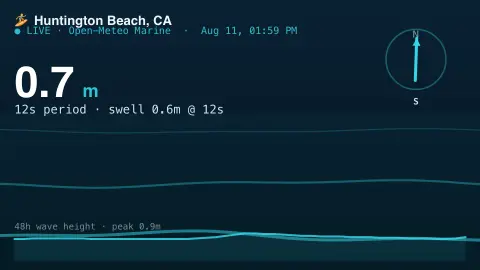
Press ESC to leave fullscreen. Settings are saved in your browser only.
How the Surf Report screensaver works
The saver fetches the live marine forecast for your chosen break from the free Open-Meteo Marine API, with no key.
It reads the significant wave height, the swell period and the direction the swell is coming from.
An animated set of waves rolls toward shore, their size scaled to the wave height and their spacing to the period.
A big readout shows the height and period with a compass for swell direction, plus an hourly wave-height sparkline.
Wave height, period and swell direction explained
Open-Meteo is an open-source weather API, and its Marine API serves wave-model output rather than sensor readings. Its Best Match default selects among models such as MeteoFrance MFWAM, ECMWF WAM, NCEP GFS Wave and DWD’s wave models, with grid resolutions from about 5 km to 50 km depending on model and region. These numerical models simulate how wind builds waves and how they travel as swell.
Three numbers do most of the work. Significant wave height is traditionally the mean height of the highest third of waves, so individual waves can be noticeably bigger or smaller; a wave about twice the significant height is possible. Swell period is the time between successive crests: longer periods generally indicate energy from distant storms. Wave direction is reported as where the waves come from, which is why a compass is used.
The caveats matter for surfers. Models work on grid cells several kilometres wide, so they cannot resolve how a specific reef, sandbar, headland or tide changes the wave at one beach. Treat the display as a regional ocean forecast and judge a real session by looking at the water.
A worked example
For a break like Waikiki the panel might read 1.2 m @ 9 s with the swell arrow pointing onshore, clean lines marching in on the animation, and the next hours sketched as a little wave-height graph.
Settings & tips
- Surf spot chooses which break to report on.
- Units switches wave height between metres and feet.
- Wave color recolours the ocean.
Frequently asked questions
- Is the surf data live?
- Yes. Wave height, period and swell direction come live from the Open-Meteo Marine model and refresh while it runs.
- Does it need a key?
- No. Open-Meteo's marine API is free and key-less; the saver only needs an internet connection.
- Which breaks can I pick?
- A built-in set of famous spots including Huntington Beach, Waikiki, Bali, Biarritz and Cape Town.
- Is this a forecast or live measurement?
- It's the marine model's current estimate for the spot — the same kind of data surf forecasts are built on.
- Is it free?
- Yes — free, no download, in your browser.
- Why does a longer swell period usually mean better waves?
- Waves from distant storms sort into long, evenly spaced lines that carry more energy, while short-period waves are usually local wind chop. It is a rule of thumb, not a guarantee.
- What does significant wave height actually mean?
- It is a statistical summary, traditionally the mean height of the highest third of waves. Individual waves vary around it, and one roughly twice as high can occur.
- Why might the numbers differ from what a local surf shop reports?
- The model works on a grid cell several kilometres wide and does not capture local seabed shape or tide in detail, while a local report reflects how swell actually breaks at one spot.