METAR Board Screensaver
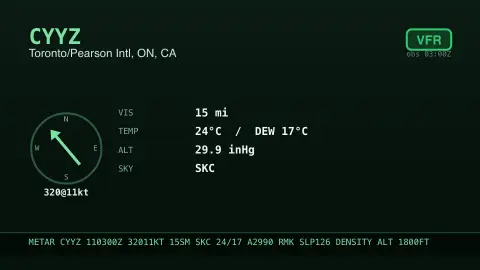
The METAR Board screensaver is a live aviation-weather board of METAR flight strips for major airports — wind, visibility, sky and the green-amber-red flight category — from the key-less U.S. aviation weather service via the pipeline. It's free, runs in your browser, and ESC exits.
Live preview
Press ESC to leave fullscreen. Settings are saved in your browser only.
How the METAR Board screensaver works
A background pipeline pulls the latest METAR observation for your chosen airport from the U.S. aviation weather service, with no key.
The saver lays it out as a flight strip: the airport, a colored flight-category chip, and a wind compass.
Visibility, temperature, dew point, altimeter and sky cover are shown alongside, the way a dispatcher reads them.
The raw METAR string sits at the bottom in monospace, and the strip refreshes on a schedule.
Decoding a METAR flight strip
METAR is the international coded format for routine airport weather observations. Most stations issue reports hourly or half-hourly, and a special report (SPECI) can be issued between them when conditions change significantly at a staffed station. Pilots, dispatchers and air traffic controllers all rely on them. The data shown here comes from the U.S. aviation weather service.
A raw report is dense but regular. It carries a station code and a time in UTC (Zulu), then wind direction and speed, visibility, present weather, cloud layers by coverage and height, temperature and dew point in degrees Celsius, and the altimeter setting. Wind is usually in knots but can be in km/h or m/s depending on the country, and visibility is in metres in international reports and statute miles in North American ones. Cloud cover is counted in eighths of the sky (oktas), so FEW, SCT, BKN and OVC are progressively fuller layers.
The coloured flight category is a derived summary of ceiling and visibility. In the US scheme, VFR means visibility over 5 miles and a ceiling above 3,000 feet; MVFR, IFR and LIFR step down through tighter limits, with LIFR below 1 mile or a 500-foot ceiling. It describes the airport at observation time and is not a forecast.
A worked example
For London Heathrow the strip might glow green for VFR, the wind needle pointing from the southwest at 12 knots, with the raw line EGLL 281550Z 22012KT 9999 FEW040 18/11 Q1014 printed underneath.
Settings & tips
- Airport chooses which field's METAR to display.
- Accent recolours the strip.
- Run
automation/run.py metaron your pipeline machine to refresh the observations.
Frequently asked questions
- Is the weather real and current?
- Yes. METARs are the official airport weather observations, refreshed by the pipeline, so the strip shows real conditions.
- What does the colored chip mean?
- It's the flight category — green VFR, blue MVFR, red IFR, magenta LIFR — based on visibility and cloud ceiling.
- Why does it use a pipeline?
- The aviation weather API isn't readable directly from a browser, so a small background script fetches it and saves a snapshot.
- Can I read the raw METAR?
- Yes. The full raw observation is printed at the bottom of the strip for anyone who reads METAR code.
- Is it free?
- Yes — free, no download, in your browser.
- What do the cloud abbreviations mean?
- They describe how much of the sky a layer covers, in eighths (oktas). FEW is 1 to 2 oktas, SCT (scattered) is 3 to 4, BKN (broken) is 5 to 7 and OVC (overcast) is 8. The number that follows gives the layer height in hundreds of feet.
- What is the difference between a METAR and a TAF?
- A METAR is an observation of the weather now, while a TAF is a forecast for the area around an airport. For major civil airfields a TAF generally covers a 24 or 30 hour period.
- Why is time given in UTC?
- METARs are stamped in Zulu time (UTC), so a code like 041600Z means the 4th of the month at 16:00 UTC, whatever the local time zone.