Storm Watch Screensaver
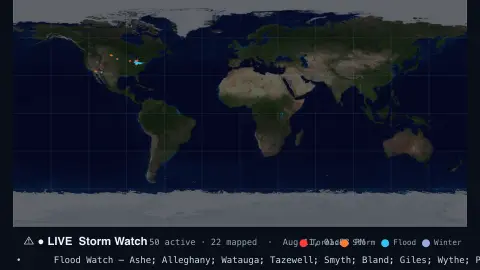
The Storm Watch screensaver is a live map of active U.S. severe-weather alerts — tornado, thunderstorm and flood warnings — glowing over their warning areas, straight from the key-less National Weather Service API. It's free, runs in your browser, and ESC exits.
Live preview
Press ESC to leave fullscreen. Settings are saved in your browser only.
How the Storm Watch screensaver works
The saver fetches the National Weather Service's live active-alerts feed, a public, key-less list of every warning in effect across the United States.
Each alert that includes a map shape is drawn as a translucent, gently pulsing polygon over its warning area on a world map.
Alerts are colored by type — tornado, thunderstorm, flood, winter — so the most dangerous ones stand out.
A live count and a scrolling ticker list the events and the areas they cover, refreshing every minute.
Where NWS alerts come from and what the types mean
The National Weather Service, part of NOAA, issues alerts for the United States, with warnings coming from local forecast offices. Its alerts are available as Common Alerting Protocol (CAP) version 1.2 messages, and the NWS API also offers feeds of the active ones by state, county or forecast zone. Many alerts define their area by NWS forecast zone rather than by a drawn shape, so some carry a polygon and others do not.
Alerts come in tiers with specific meanings. For tornadoes, the NWS describes a watch as conditions favourable for tornadoes in and near the area, while a warning means a tornado has been seen or detected on radar and people in the area are in immediate danger. Watches are issued by the Storm Prediction Center and usually cover many counties or even several states; warnings come from the local office and typically cover a city or small county.
Coverage is limited to areas the National Weather Service serves, so an empty map elsewhere means nothing about the weather. NWS asks API users not to poll more often than every 30 seconds, so a display like this is a snapshot rather than an instant feed. Treat it as an overview, and use official channels for decisions during severe weather.
A worked example
During active weather the U.S. lights up with warning polygons — a red Tornado Warning over a county, blue Flood shapes along a river — each pulsing softly while the ticker reads off Severe Thunderstorm Warning — … beneath the map.
Settings & tips
- Show limits the map to severe & extreme alerts or includes all active alerts.
- Alert color sets the default glow for untyped alerts.
- Background sets the map backdrop.
Frequently asked questions
- Are these real warnings?
- Yes. They're live alerts from the U.S. National Weather Service, the same warnings issued to the public, refreshed every minute.
- Does it cover the whole world?
- The National Weather Service covers the United States and its territories, so alerts cluster there. The map is global but the warnings are U.S.
- Should I rely on this for safety?
- No. It's an ambient display — always follow official alerts and local guidance for real safety decisions.
- Does it need a key?
- No. The NWS alerts API is free and key-less; it only needs an internet connection.
- Is it free?
- Yes — free, no download, in your browser.
- What is the difference between a watch and a warning?
- Using tornadoes as the example, a watch means conditions are favourable for them in and near the area, so be ready. A warning means one has been seen or detected on radar and people there are in immediate danger, so take shelter now.
- Why do some alerts show a precise shape and others do not?
- Many NWS alerts define their area by forecast zone rather than by a drawn polygon, so a map can only outline the zone when no polygon is supplied.