Air Quality Map Screensaver
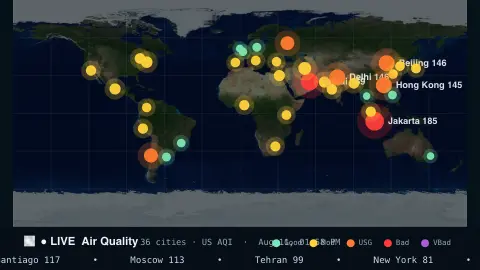
The Air Quality screensaver is a live world map that glows from green to deep red over major cities by their real-time air-quality index, from the key-less Open-Meteo air-quality API. It's free, runs in your browser, and ESC exits.
Live preview
Press ESC to leave fullscreen. Settings are saved in your browser only.
How the Air Quality screensaver works
The saver sends one request to Open-Meteo's free air-quality API for a built-in list of major world cities — no key required.
Each city is drawn as a glowing dot on a world map, colored along the standard AQI scale from green through yellow, orange and red to purple.
Dot size grows with the index, and the worst few cities pulse and are labelled so hotspots are obvious.
The data refreshes every few minutes so the map tracks changing pollution through the day.
Air quality indexes and what they combine
An air quality index converts pollutant concentrations into a single number and colour so the public can see at a glance how clean the air is. Common ingredients are fine particles (PM2.5 and PM10), ground-level ozone, nitrogen dioxide and sulphur dioxide, and in the US scale also carbon monoxide. The overall value is the highest of the individual pollutant sub-indices, so whichever pollutant is worst sets the score.
There is no single global index. The US AQI is based on EPA thresholds and runs from good through moderate, unhealthy for sensitive groups, unhealthy and very unhealthy to hazardous. The European Air Quality Index, built on European Environment Agency bands revised in 2024, uses five pollutants and runs from good to extremely poor, so the same pollution can be categorised differently by each standard.
Open-Meteo’s air-quality data comes from Copernicus Atmosphere Monitoring Service (CAMS) models: an 11 km grid over Europe and a coarser 45 km global model elsewhere. These are modelled values for a grid cell, not readings from a monitor on a specific street, and the coordinates returned can be a few kilometres from the place requested. The map is best for comparing the broad picture between cities rather than judging one spot.
A worked example
The map breathes with color — a calm green dot over one city, a pulsing red one over another mid-smog event — with the worst few labelled and a small legend mapping colors to AQI bands. Switch to the European index to see the same cities on Europe's scale.
Settings & tips
- Index switches between the US AQI and the European AQI scales.
- Refresh sets how often the readings update.
- Background sets the map backdrop.
Frequently asked questions
- Is the air-quality data live?
- Yes. Every city's index comes live from the Open-Meteo air-quality API and refreshes every few minutes while it runs.
- What do the colors mean?
- They follow the standard AQI bands — green is good, yellow and orange are moderate, red is unhealthy, and purple is very unhealthy.
- Does it need a key?
- No. Open-Meteo's air-quality API is free and key-less; the saver only needs an internet connection.
- Which cities are shown?
- A built-in spread of major cities across every continent, so you get a worldwide picture at a glance.
- Is it free?
- Yes — free, no download, in your browser.
- What is PM2.5?
- It refers to airborne particles about 2.5 micrometres across or smaller. They are small enough to be inhaled deeply, which is why they are widely monitored.
- Why do different countries score the same air differently?
- Each system sets its own concentration thresholds, pollutants and scale, so the same pollutant level can fall into different bands depending on the standard.
- Are these values from sensors?
- No, they are model estimates on a grid, from CAMS atmospheric models, so they can differ from a ground monitor at a particular location.