River Watch Screensaver
The River Watch screensaver is a live gauge of America's rivers — water height and flow at USGS monitoring stations, charted over the last day — from the key-less USGS Water Services API. It's free, runs in your browser, and ESC exits.
Live preview
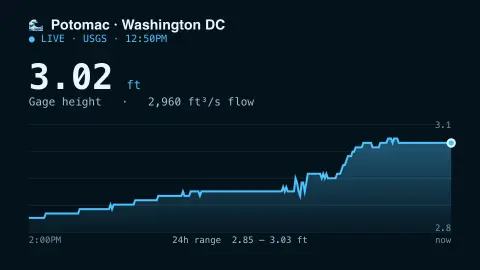
Press ESC to leave fullscreen. Settings are saved in your browser only.
How the River Watch screensaver works
The saver fetches the last day of readings for the river gauge you choose from the USGS Water Services API — a public, key-less feed.
It charts the gage height over the past 24 hours as a water-blue line and area, with the current value shown large.
Streamflow in cubic feet per second appears as a secondary readout, alongside the 24-hour range.
The chart redraws on a timer so the river level stays current.
Gage height, discharge and the rating curve
The data here comes from the United States Geological Survey. A gauge is a station beside a river with instruments that record the water level, called gage height or stage, commonly in feet above an arbitrary reference point. That zero is chosen for each station, so a stage of five feet means something different at every river.
Flow, or discharge, is derived rather than read off directly. Hydrographers make frequent manual discharge measurements at the site and use them to build a rating curve, the stage-discharge relationship that converts level readings into flow in cubic feet per second. The curve depends on the shape of the channel and floodplain, so it changes over time as vegetation grows, sand beds move or floods reshape the channel, and the USGS revises it.
Real-time readings are labelled provisional by the USGS: they have not been reviewed or edited, may change significantly and are not official until approved. The chart tells you what a river is doing now, not whether flooding is expected; official forecasts and warnings come from weather and flood agencies.
A worked example
For a gauge like Potomac · Washington DC you watch the height trace climb and fall over the day — say 2.92 ft now, 2,450 ft³/s flowing — the line filling in as fresh 15-minute readings arrive.
Settings & tips
- River gauge chooses which USGS monitoring station to watch.
- Refresh sets how often the readings update.
- Accent recolours the chart.
Frequently asked questions
- Is the river data live?
- Yes. The readings come from the USGS Water Services feed, updated roughly every 15 minutes, and the chart refreshes while it runs.
- What do the numbers mean?
- Gage height is the water level in feet at the station; streamflow is the volume passing in cubic feet per second.
- Does it need a key?
- No. The USGS Water Services API is free and key-less; the saver only needs an internet connection.
- Which rivers can I pick?
- A built-in set of U.S. gauges including the Potomac, Delaware, Mississippi, Sacramento and Willamette.
- Is it free?
- Yes — free, no download, in your browser.
- Why does a river's height number differ between sites?
- Each gauge measures stage from its own arbitrary reference point, so stage is only meaningful relative to that station's own history, not as a depth comparable with another river.
- How is flow worked out from height?
- The USGS builds a rating curve from manual discharge measurements that links stage to discharge, then applies it to the continuous level readings. The curve shifts as the channel changes, so flow estimates can be revised.
- Is this a flood warning?
- No. It shows provisional measured conditions at one station. Flood warnings come from official forecast agencies.