Natural Events Screensaver
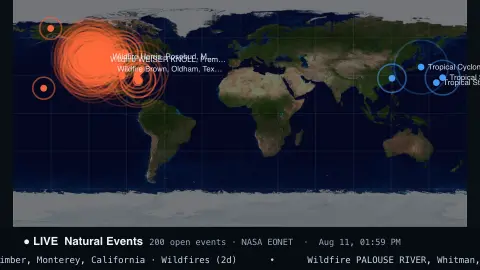
The Natural Events screensaver is a live world map of Earth's natural events — wildfires, severe storms, volcanoes and drifting icebergs — pinned at their locations from NASA's key-less EONET event tracker. It's free, runs in your browser, and ESC exits.
Live preview
Press ESC to leave fullscreen. Settings are saved in your browser only.
How the Natural Events screensaver works
The saver fetches NASA's EONET feed, which curates open natural events happening around the world from many satellite and ground sources, with no key.
Each event is plotted on a world map at its most recent location, colored by category — wildfire, storm, volcano or ice.
Markers pulse so active hotspots stand out, and the notable ones are labelled.
A live count and a scrolling ticker name the events, and the map refreshes every few minutes.
NASA EONET and how events are curated
EONET stands for Earth Observatory Natural Event Tracker, a NASA service. Each event record has a category, one or more sources and one or more geometries. A source is a reference to further information, usually the one from which the event was first curated, so the feed points back to where each event came from rather than being a complete list of everything that happens.
Categories are drawn from a fixed list that includes wildfires, severe storms, volcanoes, sea and lake ice, floods, drought, landslides, earthquakes, snow, temperature extremes, and dust and haze. An event can have several geometries, each pairing a date and time with a location (a point or polygon), which is how a moving storm or an iceberg can be followed. An event is open until it ends, and a closed event carries a closing date; requests return only open events by default.
Counts of events reflect curation and reporting as much as what is happening on the ground, and some regions or event types will be better covered than others. The map should not be used as an emergency alert service.
A worked example
Wildfire clusters glow across a continent, a tropical storm's marker sits out over the ocean, and a volcano pulses on the Ring of Fire — each pinned where it's actually happening, with the ticker reading off Tropical Storm Higos · Severe Storms beneath.
Settings & tips
- Show filters to all events, or just wildfires, storms, volcanoes or ice.
- Event color sets the default marker color.
- Background sets the map backdrop.
Frequently asked questions
- Are the events real and live?
- Yes. They come from NASA's EONET tracker of open natural events and refresh every few minutes, so the map reflects what's happening now.
- What kinds of events show up?
- Mainly wildfires, severe storms, volcanoes and sea or lake ice, plus occasional dust, smoke and landslides.
- Does it need a key?
- No. NASA's EONET API is free and key-less; the saver only needs an internet connection.
- How is this different from Volcano Watch?
- Volcano Watch focuses on volcanoes from the Smithsonian; Natural Events shows the broader mix of wildfires, storms, volcanoes and ice from NASA.
- Is it free?
- Yes — free, no download, in your browser.
- What does EONET stand for?
- Earth Observatory Natural Event Tracker, a NASA service that lists natural events with a category, sources and locations.
- Why can an event have more than one location?
- Events like storms and drifting icebergs move, so the record keeps a list of dated locations, and a map normally uses the latest.
- Does a quiet map mean nothing is happening?
- Not necessarily. The feed only contains events that have been curated into it, so coverage varies by region and by type of event.