Order Book Screensaver
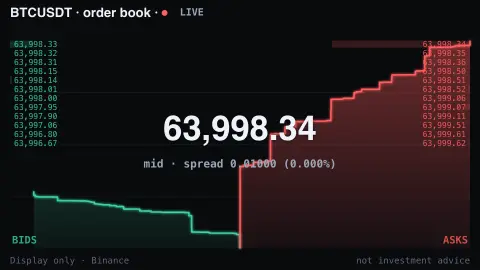
The Order Book screensaver is a live depth chart of the Bitcoin order book — the wall of buy and sell orders stacking up on each side of the price — from the key-less Binance API. It's free, runs in your browser, display only, and ESC exits.
Live preview
Press ESC to leave fullscreen. Settings are saved in your browser only.
How the Order Book screensaver works
The saver pulls the live order book for a crypto pair from Binance — the open buy (bid) and sell (ask) orders waiting at each price.
It draws them as a depth chart: a green wall of cumulative bids on the left and a red wall of cumulative asks on the right.
The current mid-price and the spread between best bid and ask sit in the center, with a ladder of the nearest orders.
It refreshes every couple of seconds and eases between snapshots, so the walls breathe as orders flood in and pull out.
Order books, spreads and depth
An order book is a live list of the offers to buy and sell an asset on an exchange. Bids are the prices buyers are willing to pay, asks are the prices sellers want, and the two lists are sorted so the best bid and best ask sit in the middle. Binance’s public market-data REST API has an order book endpoint that returns the bids and asks for a trading pair as lists of price and quantity pairs.
A depth chart turns that list into two cumulative curves. Reading outward from the middle, each step shows the total quantity available up to that price, so a steep wall means a lot of size is waiting at nearby prices, while a shallow slope means the book is thin. The gap between best bid and best ask is the spread, a rough indicator of how costly it is to trade right away.
The picture is a snapshot of intentions, not of trades. Orders can be added or cancelled at any time, so a big wall is not a guarantee that the price will hold. The endpoint returns only a limited number of price levels per request, so it shows the nearest part of the book. This book covers one venue only; the same asset trades on many exchanges, each with its own book. The display is informational and not advice about buying or selling.
A worked example
Around a $59,454 mid-price the green bid wall and red ask wall rise away on either side, a thin spread between them, the whole book shifting and re-stacking every couple of seconds as traders place and cancel orders.
Settings & tips
- Pair switches between BTC, ETH and SOL against USDT.
- Accent recolours the depth highlights.
- Background sets the panel backdrop.
Frequently asked questions
- Is the order book live?
- Yes. It comes from Binance and refreshes every couple of seconds, so the depth chart shows the real live book.
- What is a depth chart?
- It plots the cumulative size of buy and sell orders at each price — the taller the wall, the more orders waiting there.
- Is this investment advice?
- No. It's a display of public market data for ambiance, not advice, and not a trading tool.
- Does it need a key?
- No. The Binance market-data API is free and key-less; the saver only needs an internet connection.
- Is it free?
- Yes — free, no download, in your browser.
- What does a tall wall of orders mean?
- It means a large quantity is currently offered at or near that price level. It does not mean the price will stop there, because the orders can be cancelled at any moment.
- Why is the spread sometimes tiny and sometimes wide?
- Heavily traded pairs usually have many participants quoting close together, which narrows the spread. When trading is quiet or markets are volatile, quotes move further apart.