Mission Control Launch Screensaver
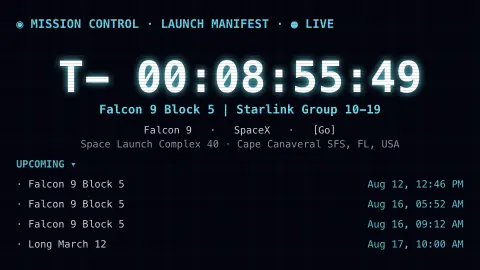
The Mission Control screensaver is a countdown board to the next rocket launch on Earth, showing the vehicle, agency and pad with a live T-minus clock, from the key-less Launch Library 2 spaceflight API. It's free, runs in your browser, and ESC exits.
Live preview
Press ESC to leave fullscreen. Settings are saved in your browser only.
How the Mission Control screensaver works
The saver fetches the upcoming-launch schedule from the free Launch Library 2 API, which tracks rockets from every major space agency and company.
It locks onto the soonest launch and counts down to its liftoff time with a live T-minus clock, recomputed every frame.
The board shows the rocket, the agency or company, the launch pad and location, and the current go/hold status, with the next few launches listed below.
When a launch time passes, the board rolls on to the next one in the schedule.
How Launch Library 2 tracks the launch schedule
Launch Library 2 is a database of rocket launches, space events and crewed spaceflight, run by The Space Devs and described as the official successor of the Launch Library API. It is free to access, with a limited number of unauthenticated requests per hour, and it feeds launch-tracking apps and websites. Each launch is tied to a rocket configuration, a provider, a pad and a status.
Launch times in the feed are targets, expressed as a NET, or no-earlier-than, time. Real launches slip often because of weather, technical issues or range conflicts, and the countdown on screen reflects the latest target, not a guarantee. Dates further out are often tentative and firm up closer to liftoff, so the sequence of launches on the board can reshuffle.
The list covers launches worldwide from many agencies and commercial providers. Some missions publish little detail, and some small launchers appear with only a vague window. T-minus is simply the time left until the stated target; on a real countdown, holds can pause the clock while engineers resolve an issue.
A worked example
You might see T- 02:14:09 ticking down to a Falcon 9 · Starlink from Cape Canaveral, with the next few missions queued underneath. Filter to a single provider and the board follows only that agency's launches.
Settings & tips
- Agency filters the board to one provider (e.g. SpaceX or NASA) or shows all launches.
- Accent recolours the console glow.
- Background sets the console backdrop.
Frequently asked questions
- Is the countdown real?
- Yes. The launch time comes from the Launch Library 2 schedule and the T-minus clock counts down to that real liftoff target, updating live.
- Where does the data come from?
- The Launch Library 2 API by The Space Devs — a free, key-less database of upcoming orbital launches worldwide.
- Why did the launch on the board change?
- Schedules slip and launches happen. When the soonest one passes or is rescheduled, the board advances to the next upcoming launch.
- Does it need a key?
- No. The API is free and key-less; the saver only needs an internet connection and refreshes occasionally to respect rate limits.
- Is it free?
- Yes — free, no download, runs in your browser.
- What does NET mean on a launch date?
- NET stands for no earlier than. It means the launch will happen at that time or later, the standard way schedules describe a target that could still move.
- Why do some launches vanish from the list?
- A launch may be moved to a later date, scrubbed, or reclassified as the data provider updates it. The upcoming list shows the schedule as currently understood, which can differ from last week's.