Blue Marble Earth Screensaver
The Blue Marble screensaver shows the entire sunlit face of the Earth, photographed today from a million miles away by NASA's DSCOVR satellite, drifting through the day's frames — a real-photo blue marble. It's free, key-less, runs in your browser, and ESC exits.
Live preview
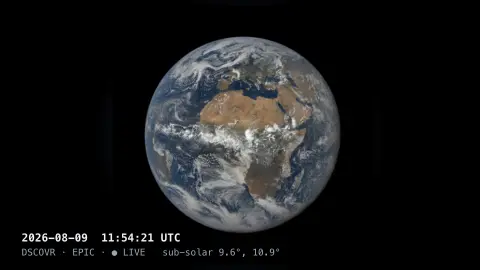
Press ESC to leave fullscreen. Settings are saved in your browser only.
How the Blue Marble screensaver works
The saver reads NASA's EPIC image list for the DSCOVR satellite, which sits a million miles out at the Earth–Sun L1 point and photographs the whole sunlit disc.
It builds each frame's image URL from the day's catalogue and preloads the set — around twenty views spanning the day.
The frames play in order so the Earth appears to rotate slowly beneath the camera, with a gentle drift.
It re-fetches periodically to pick up the latest day's imagery as NASA publishes it.
How DSCOVR's EPIC camera photographs the Earth
The Earth Polychromatic Imaging Camera, or EPIC, rides on the Deep Space Climate Observatory, which launched on 11 February 2015 and reached its orbit in June 2015. NOAA operates the spacecraft, while NASA built it and operates EPIC. DSCOVR sits near the Sun-Earth Lagrange-1 point, roughly 1.5 million km from Earth toward the Sun, where gravity balances so it can keep the whole sunlit disc in view rather than a partial view.
EPIC is a 30 cm Cassegrain telescope feeding a 2048 by 2048 pixel CCD through a filter wheel with ten narrow bands from about 317 to 780 nm. NASA says it images the entire sunlit Earth every 60 to 100 minutes. Colour pictures are built from the blue, green and red band images. Because the filter wheel steps through the bands, the component exposures are taken a short time apart, so moving clouds can show faint colour fringes at their edges.
The same data are used to produce ozone, aerosol, cloud height and vegetation products. NASA offers two image collections, natural colour and enhanced colour, so what you see is a processed rendering and not a single raw frame. The saver shows only the frames available for each day.
A worked example
You watch the real Earth turn — the Americas sliding into view, then the Atlantic, clouds and all — each frame an actual photograph taken that day from deep space, captioned with the date and the sub-solar point.
Settings & tips
- Refresh sets how often the day's frame list is re-fetched.
- Slow drift adds a gentle pan and zoom to the disc.
- Background sets the space color.
Frequently asked questions
- Are these real photos of Earth?
- Yes. They're actual images from NASA's DSCOVR/EPIC camera at L1, taken the same day, showing the whole sunlit Earth.
- Why doesn't it update every second?
- DSCOVR images the Earth a limited number of times per day from deep space, so the loop covers that day's frames rather than live video.
- Does it need a key?
- No. NASA's EPIC image list is public and key-less; the saver only needs an internet connection.
- How is this different from the Spinning Globe?
- The Globe is a rendered model you can spin; Blue Marble is a sequence of real same-day photographs from a satellite.
- Is it free?
- Yes — free, no download, in your browser.
- How often does EPIC take a picture of the whole Earth?
- NASA says EPIC images the entire sunlit Earth every 60 to 100 minutes, so a day’s sequence has a limited number of frames.
- Are the colours exaggerated?
- NASA publishes separate natural-colour and enhanced-colour collections. Natural-colour images are processed composites of the red, green and blue bands, adjusted to approximate what a human eye would see, so they are not single raw photographs.