Satellites Overhead Screensaver
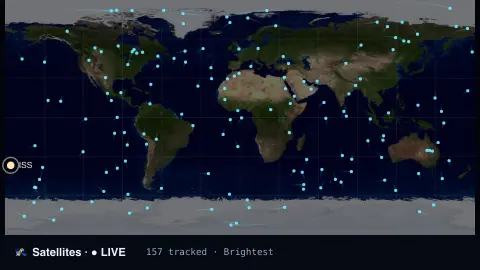
The Satellites Overhead screensaver is a live world map of the satellites crossing overhead right now — the ISS, Starlink and more — propagated from fresh orbital elements published by CelesTrak. It's free, key-less, runs in your browser, and ESC exits.
Live preview
Press ESC to leave fullscreen. Settings are saved in your browser only.
How the Satellites Overhead screensaver works
The saver downloads up-to-date orbital elements (TLEs) from CelesTrak, the public catalogue of tracked satellites, with no key required.
For every satellite it propagates the orbit to the current second, solving Kepler's equation and rotating the orbit into Earth-fixed coordinates.
The sub-satellite point — the spot on Earth each satellite is directly above — is plotted on a world map, with the ISS highlighted and labelled.
Positions are recomputed every frame so the dots sweep across the map in real time, with optional orbit trails behind them.
Orbital elements and where a satellite is
The positions drawn here depend on two-line element sets, NORAD’s format for describing an orbit. Each set is two 69-character lines of numbers giving the orbit’s shape and orientation, plus an epoch: the reference time to which the element values apply. CelesTrak, whose pages are written by astrodynamics specialist T.S. Kelso, obtains the data from Space-Track, the US government source, and checks for new sets every two hours.
To turn those numbers into a position, software uses the SGP4 model the elements were fitted for. A prediction is only as good as the elements are fresh: accuracy degrades as the current time moves away from the epoch, and a satellite that manoeuvres will not match its old elements until new ones are issued.
The dot marks the sub-satellite point, the place on the surface directly beneath the satellite, not the area from which it can be seen. A satellite may be on the map yet below your local horizon, and seeing one with the naked eye also needs darkness at your location while the satellite is still in sunlight.
A worked example
Choose the brightest-satellites group and dozens of dots streak west-to-east across the map, the ISS among them with its own label. Switch to Starlink and a whole constellation marches across in formation, each one propagated from its real orbit.
Settings & tips
- Group chooses brightest visible satellites, space stations, or Starlink.
- Orbit trails draws a short fading tail behind each satellite.
- Satellite color recolours the dots and trails.
Frequently asked questions
- Are the satellites really there?
- Yes. Positions are propagated from real, recently-published orbital elements, so the dots show where those satellites actually are over Earth.
- How accurate are the positions?
- It uses a fast two-body propagation, accurate enough for a live moving map but not for precise pass predictions — for that, use a dedicated tracker.
- Does it need a key?
- No. CelesTrak's orbital elements are free and key-less; the saver only needs an internet connection to refresh them.
- Why are there so many Starlink satellites?
- SpaceX's Starlink is a large constellation of thousands of satellites, so that group fills the map with dots.
- Is it free?
- Yes — free, no download, in your browser.
- What is a TLE epoch?
- The epoch is the reference time for the element set, given as a year and a day-of-year with a fraction. The further the current time is from that epoch, the less accurate the predicted position becomes.
- Why can I not see a satellite just because it is overhead?
- To see one, the sky must be dark at your location while the satellite is still lit by the Sun. A satellite in Earth’s shadow, or in full daylight, is generally invisible to the naked eye.
- Where do the orbital elements come from?
- They are generated from US Space Surveillance Network observations for the SGP4 model and distributed through Space-Track. CelesTrak obtains them from there.