Live Moon Screensaver
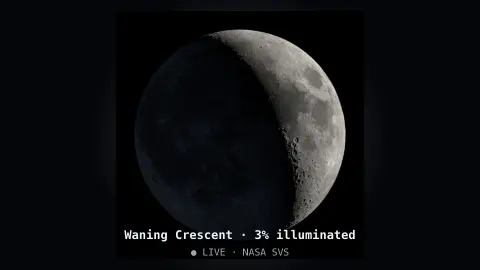
The Live Moon screensaver shows the Moon as it looks right now — the real phase and libration imaged by NASA's visualization studio and refreshed hour by hour. It's free, key-less, runs in your browser, and ESC exits.
Live preview
Press ESC to leave fullscreen. Settings are saved in your browser only.
How the Live Moon screensaver works
The saver loads NASA's hourly Dial-a-Moon visualisation — a rendering of the Moon's exact phase and libration for the current hour, built from Lunar Reconnaissance Orbiter data.
It works out the current hour of the year and fetches that frame, so the Moon you see matches the real sky tonight.
If the image can't load, it falls back to drawing the Moon itself — the lit fraction computed from the lunar cycle on your device.
The phase name and percent illuminated are shown, and it refreshes every hour as the Moon waxes or wanes.
Phases, libration and how NASA renders the Moon
The phase of the Moon depends on the angle between the Sun and Moon as seen from Earth. A new Moon sits in line with the Sun, a full Moon opposite it, and the cycle from one new Moon to the next takes about 29.5 days. Because the Moon's orbit is tilted and slightly eccentric, the exact timing varies by several hours from month to month.
NASA's Scientific Visualization Studio produces the Dial-a-Moon imagery from data gathered by the Lunar Reconnaissance Orbiter, in orbit since 2009: a laser-altimeter elevation map and a colour image mosaic, combined with JPL planetary ephemerides. Each frame is therefore a rendering of the geometry for that hour rather than a photograph from Earth. It includes libration, the slow rocking of the Moon that lets observers on Earth see a little over half of its surface over time.
Rendering, not live sensing, means that weather, haze and your own horizon do not enter the picture. The tilt of the Moon in the sky also depends on your latitude, so the orientation on screen may not match what you see outside, especially in the Southern Hemisphere, where the familiar face appears inverted relative to the northern view. Percent illuminated describes the lit share of the visible disc, not the brightness.
A worked example
Tonight it might read Waxing Gibbous · 78% illuminated, the terminator falling exactly where it does in the real sky, the slight nod of libration matching this hour. Each hour the image updates as the Moon moves through its phase.
Settings & tips
- Show phase info toggles the phase name and illumination overlay.
- Background sets the space color behind the Moon.
- It refreshes hourly, so the phase always matches the current sky.
Frequently asked questions
- Is this the Moon's real phase?
- Yes. It uses NASA's hourly Dial-a-Moon for the current hour, so the phase and libration match the real Moon right now.
- Does it need a key?
- No. NASA's imagery is public and key-less. If the image can't load, it draws the phase itself, so it works offline too.
- What is libration?
- Libration is the Moon's slight rocking that lets us see a bit around its edges over time. The NASA imagery shows it accurately.
- How is this different from Phase of the Moon?
- That one is a stylised render; Live Moon uses NASA's actual hourly imagery of the real Moon.
- Is it free?
- Yes — free, no download, in your browser.
- Why does the Moon look upside down in the Southern Hemisphere?
- Observers in the south view the sky from the opposite orientation, so the lunar features appear rotated by about 180 degrees compared with the northern view.
- What causes libration?
- The Moon's slightly elliptical orbit and the tilt of its axis let us see a few degrees beyond the edges at different times. Over months this exposes about 59 per cent of the surface from Earth.