Live Sun Screensaver
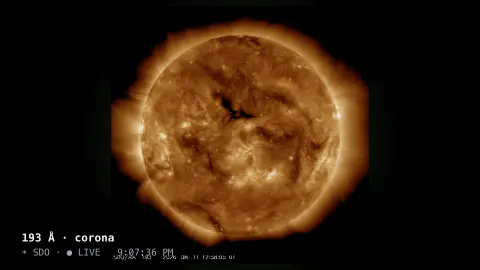
The Live Sun screensaver shows the actual Sun as photographed minutes ago by NASA's Solar Dynamics Observatory, cycling through ultraviolet wavelengths and the visible disc. It's free, key-less, runs in your browser, and ESC exits.
Live preview
Press ESC to leave fullscreen. Settings are saved in your browser only.
How the Live Sun screensaver works
The saver loads the latest solar images NASA's Solar Dynamics Observatory posts publicly — updated every few minutes, with no key required.
It can show a single wavelength or cycle through several: 193 Å and 171 Å reveal the corona and magnetic loops, 304 Å the chromosphere, and HMI shows the Sun in visible light.
The disc is drawn with a soft corona glow and a gentle breathing zoom so it feels alive.
It reloads the current image on a timer so flares and sunspots update as the Sun changes.
The Solar Dynamics Observatory and its wavelengths
The Solar Dynamics Observatory is a NASA spacecraft in a geosynchronous orbit, launched on 11 February 2010. Its Atmospheric Imaging Assembly photographs the Sun in several ultraviolet and extreme ultraviolet bands, while the Helioseismic and Magnetic Imager images the full disc in visible light around 617.3 nanometres to map surface motion and magnetic fields.
The wavelength determines what you see, because each band is dominated by emission from a particular ion at a particular temperature. The 171 angstrom channel shows the quiet corona and loops of plasma following magnetic field lines, 193 shows a hotter part of the corona and, during flares, much hotter plasma, and 304 comes mainly from helium in the chromosphere and transition region, where cooler prominences and filaments stand out. The colours in the pictures are assigned by convention, since ultraviolet light has no natural colour.
The visible-light imager shows sunspots, darker regions where strong magnetic fields hold back the convective flow of heat, so the surface there is cooler than its surroundings.
A worked example
Leave it on the cycle setting and the Sun morphs from the green-gold tangle of 193 Å coronal loops to the deep red 304 Å chromosphere and on to a crisp visible-light disc dotted with sunspots — each one a real image taken minutes earlier from orbit.
Settings & tips
- View picks one wavelength or cycles through all of them.
- Refresh sets how often the latest image is re-fetched.
- Background sets the space color behind the disc.
Frequently asked questions
- Is this the real Sun?
- Yes. The images come straight from NASA's Solar Dynamics Observatory and are only minutes old, so you're seeing the Sun close to real time.
- What do the wavelengths mean?
- Each ultraviolet band highlights a different layer: 193 Å and 171 Å the hot corona, 304 Å the chromosphere, and HMI the visible surface with sunspots.
- Does it need an API key?
- No. SDO's latest images are public and key-less; the saver just needs an internet connection.
- How often does it update?
- It re-fetches on the interval you choose, and SDO posts new images every few minutes, so flares and spots stay current.
- Is it free?
- Yes — free, no download, entirely in your browser.
- Why are the Sun's pictures in odd colours?
- Ultraviolet and extreme ultraviolet light are invisible, so each channel is given a conventional false colour. The colours help tell the channels apart and do not show real hues.
- What are the dark patches on the visible image?
- They are sunspots, regions where strong magnetic fields inhibit convection and make the surface cooler than its surroundings. They appear dark by contrast.
- Why does the view sometimes go missing or blur?
- Twice a year the spacecraft passes through eclipse seasons when Earth blocks the Sun for a short time each day, and the visible-light images can look blurry for a while afterwards.