Epoch Clock Screensaver
The Epoch Clock screensaver shows the live Unix timestamp in giant digits, a bar showing how far through the year we are, and a countdown to the next landmark epoch second. It's computed on your device, runs in your browser, and ESC exits.
Live preview
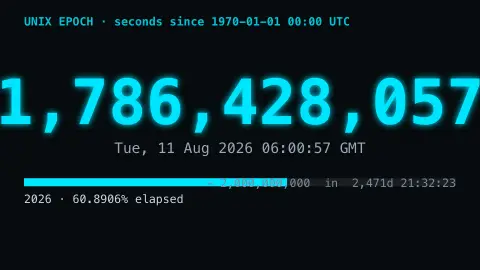
Press ESC to leave fullscreen. Settings are saved in your browser only.
How the Epoch Clock screensaver works
The saver reads your device clock and shows the Unix timestamp — the number of seconds since 1 January 1970 UTC — in big monospace digits that tick every second.
Beneath it, a progress bar shows exactly how far through the current calendar year we are, to four decimal places.
It also counts down to the next landmark epoch second, like the two-billion mark in 2033.
Everything is computed locally, so it needs no connection.
Counting from the Unix epoch
Unix time counts the seconds that have passed since midnight UTC on 1 January 1970, a reference point called the epoch. Using a single number rather than a calendar date makes it easy for computers to store timestamps, compare them and subtract them, and because it is based on UTC it is the same everywhere in the world regardless of time zone. It spread from the Unix operating system to nearly every platform.
Two quirks are worth knowing. Unix time ignores leap seconds, so each day is treated as exactly 86,400 seconds, and when a leap second is inserted the count repeats or smears. The other is the size of the number: systems that store it in a signed 32-bit integer will overflow at 03:14:07 UTC on 19 January 2038, an issue sometimes called the Year 2038 problem. Systems using 64 bits will not run out for roughly 290 billion years.
Round numbers have become minor events. The count passed one billion in September 2001, and two billion is due in 2033. The display reads your own device's clock, so it is only as accurate as that clock is.
A worked example
The counter rolls past 2,000,000,000... not yet — it reads 1,9xx,xxx,xxx and climbs one tick a second, the year bar sitting near 48%, a blinking cursor block trailing the digits like an old terminal.
Settings & tips
- Show year progress toggles the year bar.
- Accent recolours the digits and bar.
- Background sets the terminal backdrop.
Frequently asked questions
- What is Unix time?
- It's the number of seconds elapsed since midnight UTC on 1 January 1970 — the timestamp computers use under the hood.
- Does it need a connection?
- No. It reads your device clock and computes everything locally, so it runs fully offline.
- What is the landmark countdown?
- A countdown to the next round epoch second — the 2,000,000,000 mark falls in May 2033, a small computing milestone.
- Why does the last digit flicker?
- That's the live seconds ticking — the timestamp increases by one every second, in real time.
- Is it free?
- Yes — free, no download, no key, in your browser.
- What is the Year 2038 problem?
- Older systems that keep Unix time in a signed 32-bit integer will run out of range on 19 January 2038, and the value will wrap to a date in 1901 unless the software is updated to 64 bits.
- Does Unix time account for time zones?
- No. It is a single count based on UTC, and software converts it to local time for display. Two people in different countries see the same timestamp at the same moment.
- Does Unix time include leap seconds?
- No. It treats every day as 86,400 seconds, so leap seconds are absorbed by repeating or smoothing a second rather than adding one to the count.