Market Clock Screensaver
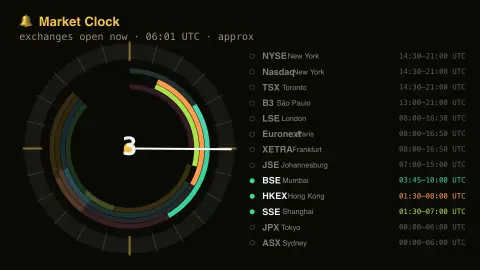
The Market Clock screensaver is a 24-hour ring showing which of the world's stock exchanges — New York, London, Tokyo, Toronto and more — are trading right now, and which are asleep. It's computed on your device, runs in your browser, and ESC exits.
Live preview
Press ESC to leave fullscreen. Settings are saved in your browser only.
How the Market Clock screensaver works
The saver knows the trading hours of the world's major stock exchanges and compares them against the current UTC time.
It draws a 24-hour ring with a sweeping now-hand and a coloured arc for each exchange's session.
Exchanges trading right now glow and are marked open; the rest dim and are marked closed.
A list names each exchange with its local hours, including Toronto's TSX; it's computed locally and ignores holidays.
Time zones, daylight saving and the trading day
A stock exchange is a marketplace with set hours, and those hours are defined in the exchange’s local time. That is what makes a world market clock interesting: converted to a single reference such as UTC, opening and closing times drift against each other when countries switch daylight saving on different dates. New York’s regular session, 9:30 a.m. to 4:00 p.m. Eastern, moves by an hour in UTC terms between winter and summer, while Japan does not observe daylight saving, so Tokyo’s hours stay fixed in UTC.
The ring lays this out as geometry. Because the Earth turns, sessions follow each other around the day: Asia-Pacific markets open first, European markets come next, and North American markets open later. Where sessions overlap, such as London and New York during the New York morning, more participants are active at once.
Keep in mind what a clock like this cannot know. Exchanges close on holidays, and some have early closes, such as the NYSE’s 1:00 p.m. close on the day after Thanksgiving. Some exchanges, including Tokyo, Hong Kong and Shanghai, pause for a midday break. Extended-hours trading also exists outside the regular session, so open or closed here describes the standard session only.
A worked example
Mid-afternoon in London the ring shows LSE, Euronext and the just-opened NYSE and TSX all glowing open, while Tokyo and Sydney sit dim on the far side, fast asleep.
Settings & tips
- Accent recolours the open-market highlights.
- Background sets the clock backdrop.
- Hours are approximate and ignore public holidays.
Frequently asked questions
- Is it accurate?
- It uses each exchange's regular trading hours against live UTC time. It's approximate — it ignores public holidays and daylight-saving shifts.
- Which exchanges are shown?
- Major venues including New York, Nasdaq, Toronto, London, Frankfurt, Paris, Tokyo, Hong Kong, Shanghai, Mumbai, São Paulo and Sydney.
- Does it need a connection?
- No. It compares exchange hours to your device clock locally, so it runs fully offline.
- Why might a market look open on a holiday?
- It only knows regular weekday hours, so it can't account for local market holidays when an exchange is shut.
- Is it free?
- Yes — free, no download, no key, in your browser.
- Why do the arcs move during the year?
- Exchanges keep local time, and countries change their clocks for daylight saving on different dates, so the same local session lands at a different UTC hour in summer and winter. Places without daylight saving, such as Japan, do not shift.
- Which markets overlap the most?
- London and New York share a window during the New York morning. Asian sessions sit earlier in the day and overlap Europe only a little, if at all, depending on the exchange and the time of year.
- Does closed mean nothing is trading?
- It means the regular session is over. Some venues offer extended-hours trading outside regular hours, and other markets such as currencies trade on different schedules.