Eclipse Countdown Screensaver
The Eclipse Countdown screensaver is a live countdown to the next solar and lunar eclipse, with a disc that darkens as the date nears, from a built-in 2026-2030 table. It's computed on your device, runs in your browser, and ESC exits.
Live preview
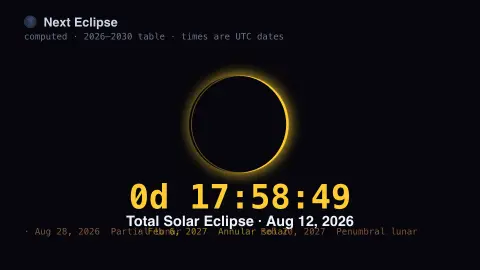
Press ESC to leave fullscreen. Settings are saved in your browser only.
How the Eclipse Countdown screensaver works
The saver holds a table of every solar and lunar eclipse from 2026 through 2030, with each one's type and date.
It finds the next eclipse and counts down to it in days, hours, minutes and seconds.
A central disc previews the event — a Moon sliding across the Sun, or the Moon slipping into Earth's red shadow — darkening as the date approaches.
You can show solar eclipses, lunar eclipses, or both; everything is computed locally.
Eclipse geometry and the saros cycle
A solar eclipse happens when the Moon passes between the Sun and Earth and its shadow touches our planet; a lunar eclipse happens when the Moon slides into Earth’s shadow. Both need the Sun, Earth and Moon to line up closely, which is why they cannot occur every month: the Moon’s orbit is tilted by about five degrees to the plane of Earth’s orbit around the Sun, so eclipses happen only when a new or full Moon falls near one of the nodes where the two planes cross.
Eclipses fall into families. The saros, about 6,585.3 days or 18 years, 11 days and 8 hours, equals 223 synodic months, and eclipses one saros apart share similar geometry. The extra eight hours means Earth turns about 120 degrees further, so a solar eclipse path shifts roughly a third of the way around the globe westward, and a series returns to about the same region every three saroses. Dates in a table like this one come from published predictions, not observation.
Types matter for what you would see. Solar eclipses can be total, annular, hybrid or partial, and totality is visible only along a narrow path. A total lunar eclipse turns the Moon a dim copper-red as sunlight is bent through Earth’s atmosphere. A countdown says an eclipse occurs somewhere, not that it is visible from your window.
A worked example
The countdown might read 184d 06:12:40 to a Total Solar Eclipse, the bright disc slowly being bitten into by a dark Moon, with the next few eclipses listed in a row beneath.
Settings & tips
- Show filters to solar, lunar, or both kinds.
- Background sets the sky backdrop.
- Dates are UTC, from a built-in 2026-2030 table.
Frequently asked questions
- Are the eclipse dates accurate?
- Yes. They come from the published eclipse canon for 2026-2030, so the type and date of each are correct.
- Does it need a connection?
- No. The table and countdown are computed on your device, so it runs fully offline.
- Will I see the eclipse where I live?
- Not necessarily — visibility depends on your location. The saver shows the date; check a local eclipse map for your view.
- What happens after 2030?
- The built-in table runs to 2030; the saver counts down to the last entry until the table is extended.
- Is it free?
- Yes — free, no download, no key, in your browser.
- Why is there not an eclipse every month?
- The Moon’s orbit is tilted relative to the plane of Earth’s orbit, so at most new and full moons its shadow misses. Eclipses occur only when the alignment happens near the nodes, the points where the two planes cross.
- Why does a total lunar eclipse look red?
- Sunlight passing through Earth’s atmosphere is bent into the shadow, and the reddish light that gets through gives the Moon its dim copper colour.
- What is the difference between a total and an annular solar eclipse?
- In a total eclipse the Moon covers the Sun completely. In an annular one the Moon is farther away and looks slightly smaller, leaving a bright ring of sunlight.