Crypto Heatmap Screensaver
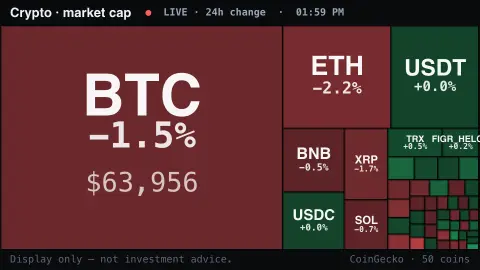
The Crypto Heatmap screensaver is a live treemap of the top cryptocurrencies sized by market value and shaded green-to-red by their 24-hour move, from the key-less CoinGecko API. It's free, runs in your browser, display only, and ESC exits.
Live preview
Press ESC to leave fullscreen. Settings are saved in your browser only.
How the Crypto Heatmap screensaver works
The saver fetches the top cryptocurrencies by market value from the free CoinGecko API, with no key.
Each coin becomes a tile in a treemap, its area proportional to its market capitalisation.
Tiles are shaded green when the coin is up over 24 hours and red when it's down, brighter the bigger the move.
The symbol and percentage change sit on each tile, and the colors ease to new values as the market moves.
Reading a market-cap treemap of crypto
CoinGecko describes itself as an independent cryptocurrency data aggregator, tracking prices, trading volume and market capitalisation for crypto assets across many exchanges. Its public API returns a ranked list of coins, each with a current price, a market-cap figure and percentage changes over several windows. A treemap is a natural way to show that list, because it turns the ranking into area.
Market capitalisation is price multiplied by circulating supply, so a coin's tile is large when the market values the whole supply highly, not when a single unit is expensive. A coin priced at a few cents can outweigh one priced in the thousands. Circulating supply is itself an estimate, and different data providers can define and count it differently, so the same coin may rank slightly differently elsewhere.
The colour reflects the percentage change in price over the trailing 24 hours, a rolling window rather than a change since midnight, which suits an asset class that trades around the clock. Stablecoins are designed to hold a steady value, so their tiles stay pale even when large. Prices are aggregated from many venues and can differ from what a particular exchange shows at the same moment. Nothing here predicts anything; it is a snapshot of relative size and recent movement.
A worked example
Bitcoin and Ethereum fill big tiles while smaller coins pack the edges, the whole board flushing green on an up day or red on a sell-off — BTC -1.5%, SOL +4.2% — a single glance at the market's mood.
Settings & tips
- Coins sets how many cryptocurrencies fill the treemap.
- Background sets the backdrop behind the tiles.
- Bigger tiles also show the coin's current price.
Frequently asked questions
- Is the market data live?
- Yes. Prices, market caps and 24-hour changes come live from CoinGecko and refresh while it runs.
- Is this investment advice?
- No. It's a display of public market data for ambiance only, not advice of any kind.
- Does it need a key?
- No. CoinGecko's public API is free and key-less; the saver only needs an internet connection.
- What do the colors mean?
- Green means the coin is up over the last 24 hours, red means it's down, and brighter tiles indicate a bigger move.
- Is it free?
- Yes — free, no download, in your browser.
- Why is one coin's tile so much bigger than the rest?
- Area follows market capitalisation, which multiplies price by circulating supply. The largest assets are worth many times more than the next tier, and a treemap makes that concentration obvious at a glance.
- Why are some tiles nearly colourless?
- Stablecoins are designed to hold a fixed value, so their 24-hour change is close to zero. Their tiles can still be large because the amount of them in circulation is large.
- Does 24-hour change mean change since midnight?
- No. It is a rolling window covering the previous 24 hours, which suits an asset class that never closes.