Wikipedia Live Edits Screensaver
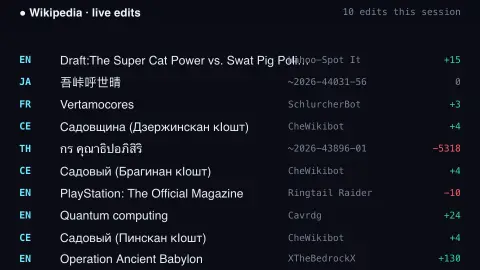
The Wikipedia Live Edits screensaver streams real edits to Wikipedia as they happen, flowing up the screen with each page's title, the editor, and how many bytes were added or removed. It connects straight to Wikimedia's public EventStreams — no key needed. It's free, runs in your browser, and ESC exits.
Live preview
Press ESC to leave fullscreen. Settings are saved in your browser only.
How the Wikipedia Live Edits screensaver works
The saver opens a Server-Sent Events connection to Wikimedia's public EventStreams endpoint — a live firehose of every change made across Wikipedia and its sister projects.
Each message describes one edit: the wiki (such as 'en' or 'de'), the page title, the user, whether it was a bot, and the old and new page sizes — from which the saver computes the byte change.
New edits drop in at the bottom and float upward, fading as they go, like a live activity log. A green '+' means bytes were added, a red '−' means removed, and brand-new pages are flagged with a star.
By default it shows only Wikipedia edits (you can include every Wikimedia wiki), and a running total counts how many edits have streamed by since you started watching.
Who edits Wikipedia, and how
Wikipedia is written by volunteers and hosted by the Wikimedia Foundation, a non-profit. Most articles can be edited by anyone, and every change is saved in a public history that records who made it, when, and what changed, so earlier versions can be restored. That openness explains the constant stream of small changes: fixing a typo, adding a citation, reverting vandalism and updating a fact after the news.
Many edits come from automated or semi-automated accounts called bots, which handle chores such as repairing links or reverting obvious damage. On English Wikipedia bots must be approved by the Bot Approvals Group and carry a bot flag. Logged-out editors were once shown as an IP address; since November 2025 English Wikipedia gives them temporary accounts instead. The byte change simply measures how much the page’s size grew or shrank, and it does not measure quality: a large addition might be spam, and a small deletion might be a crucial correction.
Wikipedia exists in many language editions, each with its own community and rules. What you see is raw activity, before any review, and some changes will be reverted soon after they are made.
A worked example
On a busy moment you'll see rows like EN Climate change Jimbo123 +148 appearing several times a second, with the occasional ✦ marking a freshly created article and a 🤖 next to bot edits. Turn on Hide bot edits to see only human changes, or switch off Wikipedia only to add Commons, Wikidata and every other project to the flow.
Settings & tips
- Wikipedia only filters out the sister projects; turn it off for the full Wikimedia firehose.
- Hide bot edits shows only human edits.
- Scroll speed sets how fast the stream rises up the screen.
Frequently asked questions
- Are these real Wikipedia edits?
- Yes. They come live from Wikimedia's public EventStreams, the same real-time feed Wikipedia itself publishes, so you're watching actual edits as they're saved.
- What do the green and red numbers mean?
- They're the byte change for that edit: green '+' means content was added, red '−' means content was removed. It's a quick sense of how big each edit was.
- Can I hide bots, or see other languages?
- Yes. There's a toggle to hide bot edits, and one to include every Wikimedia wiki (Commons, Wikidata and all languages) rather than just Wikipedia.
- Does it need an internet connection?
- Yes, it streams live data. Offline, it shows a short notice instead of the flow.
- Is this Wikipedia screensaver free?
- Yes, free and browser-based with no key or download. Run it fullscreen and press ESC to exit.
- What is a Wikipedia bot?
- A bot is an automated account that, on English Wikipedia, must be approved by the Bot Approvals Group before running. Its edits are flagged so they can be hidden from watchlists and recent changes.
- Can anyone edit any page?
- Most pages, yes, but some articles are protected so that only established accounts can change them.
- Why do some edits show a very large byte change?
- The byte change is just the difference in page size, so big numbers can come from creating a long new article, removing a long section or moving content. They are not a measure of importance.