Into The Ubuntu Archive Screensaver
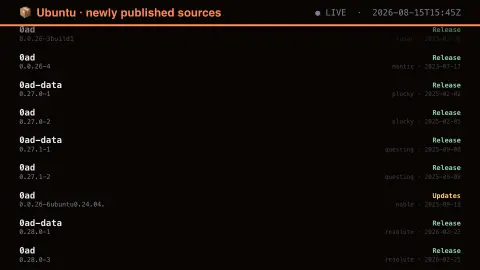
The Into The Ubuntu Archive screensaver shows source packages as they are accepted into Ubuntu's primary archive, with version, series and pocket. The pocket is the informative part: Release is ordinary development, while Updates and Security are changes being pushed to a version people are already running today. It runs in the browser with nothing to install; press ESC to exit.
Live preview
Press ESC to leave fullscreen. Settings are saved in your browser only.
How the Into The Ubuntu Archive screensaver works
The saver reads The Launchpad API, which publishes Ubuntu's archive activity openly.
No account and no key: the request goes straight from your browser, or from this site's own refreshed copy of the feed where the source does not allow browser access.
Values are drawn on a canvas that resizes with the window, so it works on a laptop or a wall display.
If the source is unreachable the saver says so on screen rather than showing stale numbers as though they were current.
Launchpad and the life of an Ubuntu package
Ubuntu’s source packages, build services and archives are hosted on Launchpad, which is developed and maintained by Canonical, the company behind Ubuntu. A source package holds the upstream code plus the packaging files; it is built into binary packages, which are what apt installs on a machine.
Each publication record ties a package name and version to a series, the codename of an Ubuntu release, and a pocket. The Release pocket holds what the series shipped with and is not updated after release. The Security and Updates pockets carry security and non-security fixes, Proposed is an opt-in staging area for testing, and Backports holds newer software the series did not ship with and has no security support guarantee. Version strings carry history too: a suffix such as build1 usually means a rebuild without source changes, while an ubuntu suffix points to an Ubuntu-specific modification of a Debian package.
Treat the board as a stream of archive bookkeeping, not as a changelog. A new entry means the archive accepted that source, not that anything changed for users, and a rebuild can be triggered by a toolchain update alone.
A worked example
Each row names a source package and its version, with the pocket on the right in colour — green for Release, amber for Updates, red for Security. A red row means somebody spent their afternoon on a vulnerability that is now being pushed to every machine running that release.
Settings & tips
- Accent and Background recolour the display without changing the data.
- Add it to a Multi-view grid to watch it alongside other live savers.
- Press ESC at any time to leave fullscreen.
Frequently asked questions
- What is a pocket?
- It is the part of the archive an upload lands in. Release is the version as it shipped, Updates carries ongoing fixes, Security carries vulnerability fixes, and Proposed is the staging area they pass through first.
- Is this every Ubuntu package?
- No — it is the most recently published sources, newest first. The full archive holds tens of thousands of packages; this is the flow rather than the inventory.
- Is this real data?
- Yes. It comes from The Launchpad API, which publishes Ubuntu's archive activity openly. Nothing is invented or simulated, and if the source cannot be reached the saver reports that instead of drawing something plausible.
- Does it cost anything or need an account?
- No. Every screensaver here is free, runs in the browser and needs no sign-up. This one uses a public API that requires no key.
- What does a version like 1.2-3ubuntu1 mean?
- In Debian-style versions, the part before the hyphen is the upstream release and the part after is the packaging revision. The ubuntu marker means Ubuntu modified the Debian package, with the number counting those modifications.
- What is a series?
- A series is one Ubuntu release, identified by its codename. The same package name can be published in several series at once at different versions.