Does It Run On Linux Screensaver
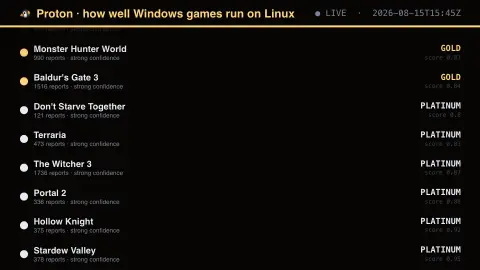
The Does It Run On Linux screensaver shows ProtonDB's community compatibility tier for a set of popular Windows games — platinum for perfect out of the box, down through gold, silver and bronze to borked. It is why the Steam Deck works: most of the biggest Windows-only titles on Steam now sit at gold or platinum. It runs in the browser with nothing to install; press ESC to exit.
Live preview
Press ESC to leave fullscreen. Settings are saved in your browser only.
How the Does It Run On Linux screensaver works
The saver reads ProtonDB's public report summaries, aggregated through this site's pipeline.
No account and no key: the request goes straight from your browser, or from this site's own refreshed copy of the feed where the source does not allow browser access.
Values are drawn on a canvas that resizes with the window, so it works on a laptop or a wall display.
If the source is unreachable the saver says so on screen rather than showing stale numbers as though they were current.
ProtonDB tiers and Linux gaming reports
Proton is a compatibility layer, built around a patched version of Wine, that lets Windows games run on Linux through Steam. Valve develops it in cooperation with developers from CodeWeavers, and the Steam Deck uses it to run more titles. ProtonDB is an unofficial, community-run website where players submit reports on how well a game runs with Proton, and it summarises them into a rating for each title.
The tiers run from platinum to borked. Platinum means a game works without modification, gold means it works very well but needs at least one tweak, silver means it runs but some performance or features do not work as expected, and borked means it will not run. Bronze is no longer a defined tier and appears only when reports fall between borked and silver. The public summary data for a game includes the tier, the best reported tier, a recent-trend tier, a confidence label and the number of reports.
Ratings reflect what a self-selected group of players reported, on a range of hardware, drivers and Proton versions, and a tier can change as games and Proton are updated. A rating is a guide and not a guarantee.
A worked example
Each game gets a coloured dot and a tier in capitals — white for platinum, gold for gold, red for borked — with the number of player reports and the aggregate score beneath. The report count matters: a confident-looking platinum backed by nine reports is a much weaker claim than a gold backed by four hundred.
Settings & tips
- Accent and Background recolour the display without changing the data.
- Add it to a Multi-view grid to watch it alongside other live savers.
- Press ESC at any time to leave fullscreen.
Frequently asked questions
- What do the tiers mean?
- Platinum runs perfectly with no changes. Gold runs perfectly after a tweak. Silver runs with minor issues, bronze runs badly, and borked does not run at all. They are community aggregates, not vendor guarantees.
- Does this cover every Steam game?
- No. ProtonDB has no list-everything endpoint, so this queries a fixed set of well-known titles. The full database covers tens of thousands of games.
- Is this real data?
- Yes. It comes from ProtonDB's public report summaries, aggregated through this site's pipeline. Nothing is invented or simulated, and if the source cannot be reached the saver reports that instead of drawing something plausible.
- Does it cost anything or need an account?
- No. Every screensaver here is free, runs in the browser and needs no sign-up. This one uses a public API that requires no key.
- What is the difference between tier and best reported tier?
- The tier is ProtonDB's overall rating from the reports for a game, while the best reported tier is the highest tier any report has reached, which can be higher than the overall rating.
- Why do multiplayer games sometimes rate poorly?
- Anti-cheat support is a common cause. Valve notes that for a Proton game to be Steam Deck Verified, the game and its middleware, including anti-cheat, must be supported by Proton.
- Does ProtonDB belong to Valve?
- No. It is an unofficial, community-run site. Valve's own compatibility programme is Steam Deck Verified, which rates games as Verified, Playable, Unsupported or Unknown.