What .NET Installs Screensaver
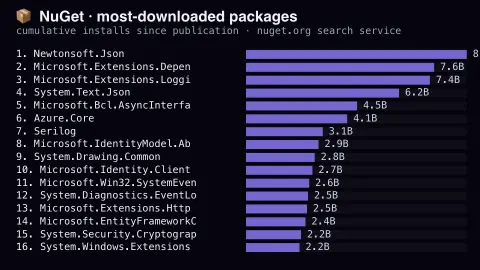
The What .NET Installs screensaver ranks NuGet packages by total downloads since publication, live from the official NuGet search service with no key. Because the count is cumulative rather than recent, it reads as an archaeology of the .NET ecosystem: Newtonsoft.Json still leads by billions, long after Microsoft shipped a built-in JSON library. It runs in the browser with nothing to install; press ESC to exit.
Live preview
Press ESC to leave fullscreen. Settings are saved in your browser only.
How the What .NET Installs screensaver works
The saver reads The public NuGet search service at azuresearch-usnc.nuget.org.
No account and no key: the request goes straight from your browser, or from this site's own refreshed copy of the feed where the source does not allow browser access.
Values are drawn on a canvas that resizes with the window, so it works on a laptop or a wall display.
If the source is unreachable the saver says so on screen rather than showing stale numbers as though they were current.
NuGet and the .NET package ecosystem
NuGet is the Microsoft-supported mechanism for sharing code in .NET. It defines how packages are created, hosted and consumed, and it ships tools such as the dotnet CLI, nuget.exe and Visual Studio’s package manager. A package is a single ZIP file with the .nupkg extension containing compiled code, related files and a manifest, and nuget.org is the central public host.
The key phrase on this screen is total downloads. A cumulative count favours packages that have existed a long time, or that other packages depend on. It rewards early arrivals in a way a weekly chart would not, so a library that was dominant a decade ago can sit near the top even if newer ones are favoured today. Many of the entries are foundations rather than well-known applications.
Counts reflect every download, including automated ones. NuGet restores a project’s referenced packages on build servers and fresh clones, and it manages whole dependency graphs, so widely used packages are fetched again and again as a dependency of others. Download totals indicate reach, not quality, and they do not separate a living project from an abandoned one.
A worked example
Sixteen bars, longest at the top, each labelled with the package id and its total install count in billions or millions. Newtonsoft.Json sits at the top; below it the Microsoft.Extensions.* family — dependency injection, logging, configuration — which is the modern stack that most new .NET projects pull in without thinking about it.
Settings & tips
- Accent and Background recolour the display without changing the data.
- Add it to a Multi-view grid to watch it alongside other live savers.
- Press ESC at any time to leave fullscreen.
Frequently asked questions
- Why is Newtonsoft.Json still first?
- Because the figure is cumulative. For most of .NET's history it was the only reasonable JSON library, so it accumulated an enormous lead that System.Text.Json has not yet closed even though new projects increasingly use the built-in one.
- Does this show current popularity?
- Not exactly. It shows lifetime installs, which favours packages that have been around a long time. A package published last year would need extraordinary adoption to appear here at all.
- Is this real data?
- Yes. It comes from The public NuGet search service at azuresearch-usnc.nuget.org. Nothing is invented or simulated, and if the source cannot be reached the saver reports that instead of drawing something plausible.
- Does it cost anything or need an account?
- No. Every screensaver here is free, runs in the browser and needs no sign-up. This one uses a public API that requires no key.
- Why use total downloads instead of recent downloads?
- This view ranks by the cumulative download count, which favours long-established packages. It tells you about historical reach, not about what developers choose this month.
- Do dependencies count towards a package’s downloads?
- Generally yes. NuGet installs the packages a package depends on, so widely used utility packages are pulled in by many others and accumulate downloads that way.