Snow Report Screensaver
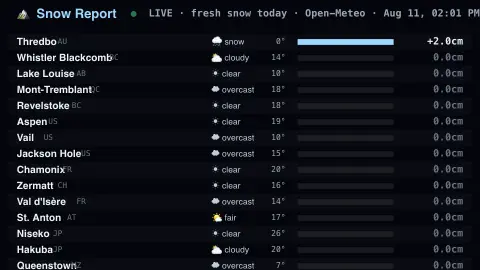
The Snow Report screensaver is a snow-stake board for ski resorts worldwide — including Whistler, Banff and Mont-Tremblant — showing fresh snowfall and conditions live from the key-less Open-Meteo API. It's free, runs in your browser, and ESC exits.
Live preview
Press ESC to leave fullscreen. Settings are saved in your browser only.
How the Snow Report screensaver works
The saver asks Open-Meteo for today's snowfall, temperature and conditions at a built-in list of ski resorts, Canadian resorts first.
It lays them out as a board ranked by fresh snow, each resort with a snow bar, its temperature and a weather icon.
Powder days rise to the top, so you can see where it's dumping at a glance.
Switch between centimetres and inches; it refreshes through the day.
Why a snow report and a snowfall number disagree
Skiers care about fresh powder, but a snowfall figure from a weather model is not the same as a resort’s own snow report. Open-Meteo combines output from national weather services into one hourly series, choosing the highest-resolution model available for each location, with grids anywhere from about one to fifty kilometres. A resort report, by contrast, comes from measurements taken on the mountain itself.
Several things make the two disagree. A model grid cell around a mountain may average a valley and a ridge, while real snowfall varies sharply with elevation. Wind can scour snow off exposed slopes and pile it up in sheltered ones. And a model’s snowfall number is a conversion: Open-Meteo’s documentation says to divide its snowfall in centimetres by 7 to get the water equivalent in millimetres, so 7 cm of snow corresponds to 10 mm of water. Real snow density varies with temperature and conditions, so a fixed ratio can be off.
Temperature adds context the total does not. A heavy dump well below freezing behaves very differently from one that falls near zero and turns to rain lower down. For lift status, avalanche conditions and snow quality, resorts and avalanche services are the authoritative sources, and a board like this is better as a quick look at where the weather is favourable.
A worked example
On a storm day Whistler Blackcomb tops the board with +22cm of fresh snow at -4°, Revelstoke and Niseko close behind, while drier resorts sit quietly near the bottom.
Settings & tips
- Units switches between centimetres and inches.
- Refresh sets how often the readings update.
- Background sets the board backdrop.
Frequently asked questions
- Is the snow data live?
- Yes. Today's snowfall and conditions for every resort come live from Open-Meteo and refresh through the day.
- Which resorts are shown?
- A worldwide spread led by Canadian resorts — Whistler, Lake Louise, Mont-Tremblant and Revelstoke — plus Alps, Rockies and Japan.
- Is this an official resort report?
- No. It's a weather-model snowfall snapshot for ambiance, not an official groomed-runs report from the resort.
- Does it need a key?
- No. Open-Meteo is free and key-less; the saver only needs an internet connection.
- Is it free?
- Yes — free, no download, in your browser.
- How much water is in a centimetre of snow?
- It varies with the snow. Open-Meteo’s documentation uses a fixed conversion of 7 cm of snow to 10 mm of water, but real snow can be lighter and fluffier or denser and wetter, so a model figure is only an estimate.
- Why can a valley and the summit differ so much?
- Temperature falls with altitude, so the summit may get snow while the base gets rain, and a model grid cell may average the two together rather than resolve the difference.
- Is fresh snow the same as good snow?
- Not always. Wind, warm spells and rain can degrade it, so depth alone does not describe skiing quality.