Hourly Forecast Screensaver
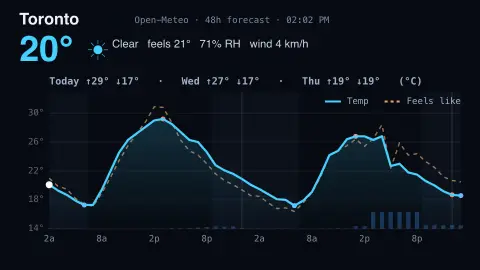
The Hourly Forecast screensaver shows current conditions plus the next 48 hours of temperature — by city or airport code — as a graph with each day's high and low, feels-like and rain chance, or as a detailed hourly table. It's live from the key-less Open-Meteo API, runs in your browser, and ESC exits.
Live preview
Press ESC to leave fullscreen. Settings are saved in your browser only.
How the Hourly Forecast screensaver works
The saver fetches the current weather and the next 48 hours of hourly forecast for the city — or airport — you choose.
Type an airport code (ICAO like CYYZ or IATA like YYZ) in the Airport field to jump to that airport; leave it blank to use the city dropdown.
The graph plots temperature hour by hour with night shading, each day's high and low, a dashed feels-like line and rain-chance bars — or switch to the table for every hour's detail.
How hourly forecasts are produced
A weather forecast comes from numerical weather prediction, in which supercomputers solve the equations of atmospheric motion on a three-dimensional grid. They start from a snapshot of the atmosphere built from satellites, weather balloons, aircraft, ships and ground stations, then step it forward in time. Open-Meteo gathers output from national weather services; its default blend is built on models such as DWD ICON, NOAA GFS and ECMWF IFS, with regional models added where they exist.
Model output is on a grid, with cells that range from about 1 km to 25 km across depending on the model, so each value describes an area rather than a single point. That is one reason a forecast can differ from a nearby thermometer, especially near coasts, mountains or in cities that create their own microclimate. Forecast skill falls with lead time, so the next few hours are trusted more than the full 48.
The feels-like temperature is Open-Meteo's apparent temperature, which combines wind chill, humidity and solar radiation to approximate how conditions are perceived, so it is a calculation, not a measurement. The rain chance is a probability, derived from ensemble model runs, that more than 0.1 mm of precipitation falls in the hour. It says nothing about how much rain or for how long.
A worked example
Set it to New York — or type an airport like KLGA — and the graph sweeps the next two days: Today ↑29° ↓21°, Tue ↑31° ↓22°, the forecast high marked on the curve. That daily high is exactly what weather prediction markets settle on; flip to the table for the full hourly detail — or open the Weather markets 4-up to watch New York, Chicago, Miami and Austin together.
Settings & tips
- Airport code overrides the city — type an ICAO (CYYZ) or IATA (YYZ) code.
- View toggles the temperature graph and the detailed hourly table; Units does °C / °F.
- The graph's bottom bars show each hour's chance of rain — taller bars mean a higher precipitation probability.
Frequently asked questions
- Where does the forecast come from?
- From Open-Meteo, a free, key-less weather API — there's nothing to set up.
- Can I pick a location by airport code?
- Yes. Type an ICAO code like CYYZ or an IATA code like YYZ in the Airport field and it overrides the city. A built-in list covers major airports.
- What are the bars along the bottom of the graph?
- They're the hourly chance of rain: each bar's height is that hour's precipitation probability, so a taller bar means rain is more likely.
- Is this good for weather prediction markets?
- Yes. It surfaces each day's forecast high and low — what most weather markets settle on — over the next 48 hours, with the full hourly detail a click away.
- Can I see every hour, not just the graph?
- Yes. Switch the view to the detailed table to read each hour's temperature, feels-like, rain chance and wind.
- Is it free?
- Yes — Open-Meteo is free with no key, and it runs in your browser with no download.
- What does a 40 per cent chance of rain mean?
- Open-Meteo defines its precipitation probability as the chance of more than 0.1 mm of precipitation in the hour. A 40 per cent value means about four in ten model scenarios produced that, not that 40 per cent of the area gets rain or that it rains for 40 per cent of the hour.
- Why can the forecast differ from my thermometer?
- Model values describe a grid cell, not your exact spot. Local sun, shade, pavement, altitude and the height of your thermometer can all shift a reading from the forecast.
- What is the difference between ICAO and IATA airport codes?
- IATA codes are three letters used by airlines and travellers, while ICAO codes are four letters used in aviation operations. For example, Toronto's airport is YYZ in IATA and CYYZ in ICAO.