Header Report Card Screensaver
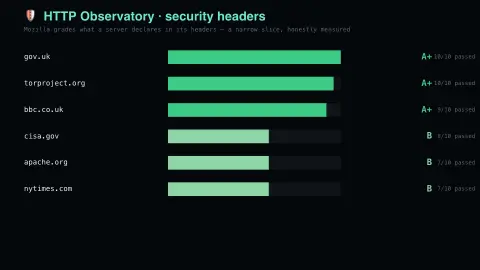
The Header Report Card screensaver shows mozilla’s HTTP Observatory grading real sites on the security headers they send, read live and key-less. It’s free, runs in your browser, and ESC exits.
Live preview
Press ESC to leave fullscreen. Settings are saved in your browser only.
How the Header Report Card screensaver works
The saver reads the source described above and draws it on a canvas — no account, no tracking.
Mozilla’s HTTP Observatory grading real sites on the security headers they send, read live and key-less. It sees only what a server declares, so a plain static page can score an F while being perfectly well run.
It refreshes on a schedule, so what you see stays current.
Colours and any options can be changed in settings; nothing is stored beyond your own browser.
What the HTTP Observatory grades
The HTTP Observatory is a scanner for a website’s HTTP security configuration. It launched on MDN Web Docs in July 2024, where Mozilla’s MDN team runs it, replacing the older Mozilla Observatory, and it looks only at HTTP data, with no TLS or certificate analysis. The headers it checks tell the browser how to behave: Content-Security-Policy limits where scripts can load from, Strict-Transport-Security forces encrypted connections, and X-Content-Type-Options stops content sniffing. It also looks at insecure cookies.
Every site starts at 100 points. Penalties are deducted for missing or weak protections, and sites that still sit at 90 or above can then earn bonus points for going beyond the baseline, up to a current maximum of 145. The result maps to a letter: 100 or more is A+, 90 to 99 is A, 0 to 24 is F.
A grade is a narrow measure. The Observatory tests preventative measures against attacks such as cross-site scripting and man-in-the-middle interception, but not outdated software, SQL injection, vulnerable CMS plugins or how passwords are stored. MDN is explicit that an A+ does not mean a site is fully secure.
A worked example
Mozilla’s HTTP Observatory grading real sites on the security headers they send, read live and key-less. It sees only what a server declares, so a plain static page can score an F while being perfectly well run.
Settings & tips
- Accent and Background recolour the display.
- Every value on screen comes from the live source — nothing is simulated.
- Press ESC to leave fullscreen.
Frequently asked questions
- Is this real data?
- Yes — it comes from the source named on this page and is refreshed on a schedule.
- Is a key needed?
- No. This source is fully key-less.
- Is it free?
- Yes, and it runs entirely in your browser.
- What is a security header?
- An instruction in the server’s HTTP response that tells the browser to switch on a protection, such as always using HTTPS or restricting where scripts may load from. The browser enforces it on the visitor’s side.
- Does an F mean the site is dangerous?
- Not by itself. On this scale an F is a score below 25 after penalties, which means the site is missing many of the headers the tests look for. The scan cannot see software flaws or how the site is run.
- Does an A+ mean a site is secure?
- No. MDN says an A+ does not make a site fully secure: the Observatory checks header-based protections, and it does not test for things like outdated software, SQL injection or weak password handling.