Supply Chain Report Card Screensaver
The Supply Chain Report Card screensaver shows openSSF Scorecard grades for the open-source projects the internet runs on, read live and key-less. It’s free, runs in your browser, and ESC exits.
Live preview
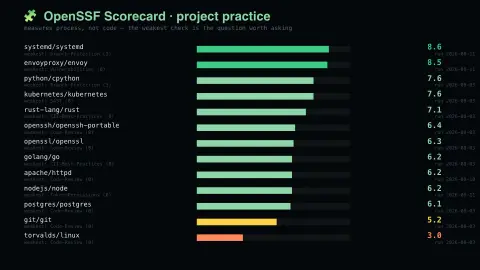
Press ESC to leave fullscreen. Settings are saved in your browser only.
How the Supply Chain Report Card screensaver works
The saver reads the source described above and draws it on a canvas — no account, no tracking.
OpenSSF Scorecard grades for the open-source projects the internet runs on, read live and key-less. A low score is not "this is unsafe" — the Linux kernel scores badly because it develops by mailing list and the tool cannot see any of it.
It refreshes on a schedule, so what you see stays current.
Colours and any options can be changed in settings; nothing is stored beyond your own browser.
What OpenSSF Scorecard checks
Scorecard is an automated tool from the Open Source Security Foundation (OpenSSF) that assesses open-source repositories against a set of security heuristics. Each check looks at something visible in a project’s public setup: whether branch protection is enabled, whether code is reviewed before merging, whether dependencies are pinned, whether releases are cryptographically signed, whether fuzzing tools such as OSS-Fuzz are used, and whether the project is actively maintained.
Every check scores from 0 to 10, with 10 best. The overall score is a weighted average in which each check counts according to its risk level: Critical 10, High 7.5, Medium 5 and Low 2.5. The tool looks at process signals, not at the code itself, so a high score cannot tell you a program is free of bugs, and a low score does not by itself mean a project is unsafe.
The project is open about the limits. Its own documentation says the checks are heuristics with false positives and false negatives, that the scores are opinionated rather than a definitive requirement, and that they change as the heuristics are refined. A project that works in ways the checks cannot observe can look weak, so use the numbers to spot practices worth improving, not to rank trustworthiness.
A worked example
OpenSSF Scorecard grades for the open-source projects the internet runs on, read live and key-less. A low score is not "this is unsafe" — the Linux kernel scores badly because it develops by mailing list and the tool cannot see any of it.
Settings & tips
- Accent and Background recolour the display.
- Every value on screen comes from the live source — nothing is simulated.
- Press ESC to leave fullscreen.
Frequently asked questions
- Is this real data?
- Yes — it comes from the source named on this page and is refreshed on a schedule.
- Is a key needed?
- No. This source is fully key-less.
- Is it free?
- Yes, and it runs entirely in your browser.
- Does a low score mean a project is insecure?
- No. It means fewer of the measured practices were detected. The checks are heuristics that examine a project’s setup, not its code, and the project itself warns of false positives and false negatives.
- How is the overall score calculated?
- Each check scores 0 to 10, and the overall score is an average weighted by the check’s risk level, so higher-risk checks such as branch protection and code review count for more than lower-risk ones.
- How often are scores recalculated?
- Scorecard’s public scan of repositories runs weekly, so a published score can lag a recent change to a project.