What The Scanners See Screensaver
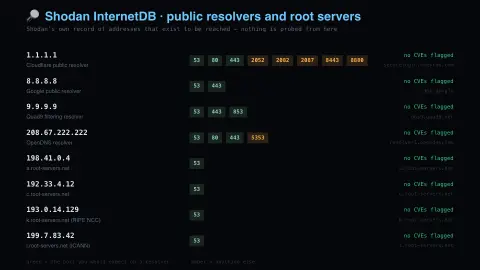
The What The Scanners See screensaver shows shodan’s own record of public resolvers and DNS root servers, read live and key-less. It’s free, runs in your browser, and ESC exits.
Live preview
Press ESC to leave fullscreen. Settings are saved in your browser only.
How the What The Scanners See screensaver works
The saver reads the source described above and draws it on a canvas — no account, no tracking.
Shodan’s own record of public resolvers and DNS root servers, read live and key-less. Nothing is probed from your machine. The reading is how small a well-run surface looks — two or three ports on a resolver answering billions of queries.
It refreshes on a schedule, so what you see stays current.
Colours and any options can be changed in settings; nothing is stored beyond your own browser.
What Shodan is and what its record shows
Shodan is a search engine for internet-connected devices rather than web pages. Created by John Matherly and launched in 2009, it scans publicly accessible devices and indexes the service banners they return, the metadata a server sends back to a client, which can include software details, supported options or a welcome message. Security professionals and researchers use it to see what is exposed on the open internet.
This screensaver reads Shodan’s existing record for public DNS resolvers and DNS root servers. Nothing is scanned from your computer: it is simply a look at what Shodan already knows. DNS resolvers are among the busiest services on the network, so the interesting detail is how few open ports a carefully run one shows.
Keep the limits in mind. A scan is a snapshot taken at one time, and a port that does not appear in it is not proof that the port is closed to everyone. Many root and resolver addresses are anycast, meaning one address is served from many machines around the world, so a single record can stand in for a whole fleet.
A worked example
Shodan’s own record of public resolvers and DNS root servers, read live and key-less. Nothing is probed from your machine. The reading is how small a well-run surface looks — two or three ports on a resolver answering billions of queries.
Settings & tips
- Accent and Background recolour the display.
- Every value on screen comes from the live source — nothing is simulated.
- Press ESC to leave fullscreen.
Frequently asked questions
- Is this real data?
- Yes — it comes from the source named on this page and is refreshed on a schedule.
- Is a key needed?
- No. This source is fully key-less.
- Is it free?
- Yes, and it runs entirely in your browser.
- Does this screensaver scan anything?
- No. It reads data Shodan has already collected, so no probing is done from your machine or toward the listed addresses.
- What is a banner?
- A banner is the metadata a service sends back when a client connects, such as server software details, supported options or a welcome message. Shodan indexes these banners, which is how it can describe what a device is running.