Every Certificate, Logged Screensaver
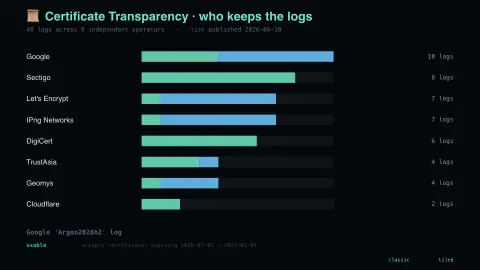
The Every Certificate, Logged screensaver shows the Certificate Transparency log ecosystem, read live from the authoritative log list and key-less. It’s free, runs in your browser, and ESC exits.
Live preview
Press ESC to leave fullscreen. Settings are saved in your browser only.
How the Every Certificate, Logged screensaver works
The saver reads the source described above and draws it on a canvas — no account, no tracking.
The Certificate Transparency log ecosystem, read live from the authoritative log list and key-less. Browsers refuse certificates that were not also published to append-only logs run by independent operators, which is what made mis-issuance visible.
It refreshes on a schedule, so what you see stays current.
Colours and any options can be changed in settings; nothing is stored beyond your own browser.
How Certificate Transparency works
A certificate authority can wrongly issue a TLS certificate for a domain whose owner never asked for one. Certificate Transparency, started by engineers at Google and specified in the experimental RFC 6962 (since obsoleted by RFC 9162), answers that by recording certificates in public, append-only logs that anyone can query and audit. A site owner can watch the logs for certificates naming their domains.
Each log is a Merkle tree: certificate hashes are the leaves, parent nodes hash pairs of children, and the root is signed to produce a Signed Tree Head, so history cannot be quietly rewritten. When a certificate authority submits a certificate, the log returns a signed certificate timestamp (SCT), a promise to include it within the log's maximum merge delay, and the SCT is attached to the certificate. Chrome and Safari require SCTs from a number of logs that depends on the certificate's lifetime.
The list shown is the set of logs that browsers recognise. A log has a state in the browser lists, such as usable, read-only or retired, and a retired log's SCTs stop counting toward compliance after a set date. Many logs are temporally sharded, each shard accepting only certificates whose expiry falls in its date range, so one operator may run several. Being in a log shows a certificate is visible, not that it is legitimate.
A worked example
The Certificate Transparency log ecosystem, read live from the authoritative log list and key-less. Browsers refuse certificates that were not also published to append-only logs run by independent operators, which is what made mis-issuance visible.
Settings & tips
- Accent and Background recolour the display.
- Every value on screen comes from the live source — nothing is simulated.
- Press ESC to leave fullscreen.
Frequently asked questions
- Is this real data?
- Yes — it comes from the source named on this page and is refreshed on a schedule.
- Is a key needed?
- No. This source is fully key-less.
- Is it free?
- Yes, and it runs entirely in your browser.
- What is a signed certificate timestamp?
- A log's signed promise to include a certificate within its maximum merge delay. The issuer attaches it to the certificate so browsers can check the certificate was logged.
- Why are logs split by year?
- Many logs are temporally sharded: each shard accepts only certificates expiring in a set date range, so each log stays a manageable size and old shards can be retired.
- Does logging prevent bad certificates?
- No, it makes them detectable. Domain owners and monitors can spot unexpected certificates and report them to the issuer.