Watching The Planet Screensaver
The Watching The Planet screensaver streams the datasets curated by Resource Watch — the satellite and sensor feeds used to monitor fires, drought, forest loss, coral bleaching and air quality. It runs in the browser with nothing to install; press ESC to exit.
Live preview
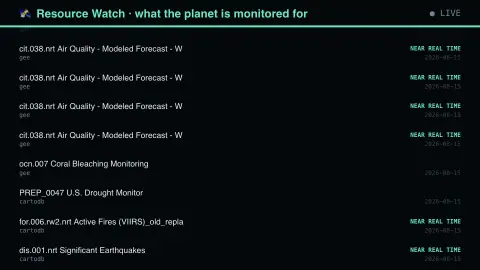
Press ESC to leave fullscreen. Settings are saved in your browser only.
How the Watching The Planet screensaver works
The saver reads The Resource Watch API, run by the World Resources Institute.
No account and no key: the request goes straight from your browser, or from this site's own refreshed copy of the feed where the source does not permit browser access.
Values are drawn on a canvas that resizes with the window, so it works on a laptop or a wall display.
If the source is unreachable the saver says so on screen rather than showing stale numbers as though they were current.
The Resource Watch catalogue of planet data
Resource Watch is a platform hosted by the World Resources Institute (WRI), a research non-profit, and built with more than 30 partners. It provides data on the environment and human well-being, covering topics such as climate change, water risk, air pollution, poverty and human migration, and holds hundreds of datasets on the state of the planet's resources and people. It has a public API that lists each dataset along with its descriptive metadata.
WRI describes the data as curated by its experts from peer-reviewed and authoritative sources, with many datasets available under open licences and the platform's code open source. What you see on the display is the catalogue, the list of what has been made available, not the measurements inside the datasets. A listing carries a name and descriptive metadata, and the entries are written for researchers, so names can be technical.
That distinction is the point of the saver: the catalogue reflects what someone decided was worth putting on a shared map. Gaps in the list are not evidence that something is not happening, only that it is not represented here. WRI's own About page also states that the Resource Watch site is no longer being updated and will be archived, so treat the list as a snapshot of a curated collection rather than a growing live record.
A worked example
Each row names a dataset and its data provider, with near-real-time feeds flagged. The catalogue is effectively a list of what institutions have decided is worth watching continuously, which is a different question from what gets measured once. Entries carrying “nrt” in their identifier are the ones updating today rather than annually.
Settings & tips
- Accent and Background recolour the display without changing the data.
- Add it to a Multi-view grid to watch it alongside other live savers.
- Press ESC at any time to leave fullscreen.
Frequently asked questions
- What is Resource Watch?
- A platform run by the World Resources Institute that curates environmental datasets from many providers into one catalogue, so they can be compared and mapped together.
- What does near real time mean here?
- That the feed updates within hours to days of observation, typically from satellites. It is distinct from the annual or decadal datasets that make up much of environmental monitoring.
- Is this real data?
- Yes. It comes from The Resource Watch API, run by the World Resources Institute. Nothing is invented or simulated, and if the source cannot be reached the saver reports that instead of drawing something plausible.
- Does it cost anything or need an account?
- No. Every screensaver here is free, runs in the browser and needs no sign-up. This one uses a public API that requires no key.
- Who runs Resource Watch?
- The World Resources Institute hosts and convenes the platform, which was built with more than 30 partners and supported by several funders.
- Does a listing mean the data is current?
- Not necessarily. A listing shows that a dataset was made available, not that it is up to date; check the individual dataset's own metadata for its update status.
- Are the datasets open?
- WRI states that many datasets are publicly available under open licences, but terms differ by dataset, so check each record.