Live Weather Screensaver
The Weather screensaver shows live, current conditions for any city you name, with an animated sky that matches the real weather — sun, clouds, rain, snow or thunderstorms. It geocodes your city and fetches the latest temperature, humidity and wind from the free Open-Meteo service, with no API key required. It runs in your browser, refreshes itself periodically, and you press ESC to exit.
Live preview
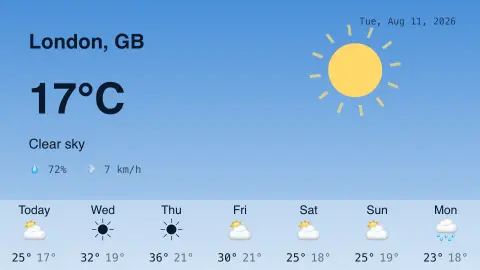
Press ESC to leave fullscreen. Settings are saved in your browser only.
How the Weather screensaver works
On start it geocodes the city name you enter through Open-Meteo's geocoding API to get coordinates, then fetches current conditions — temperature, humidity, wind speed, weather code and a day/night flag — from Open-Meteo's forecast API. Because this is a live fetch, the Weather screensaver needs an internet connection.
The returned WMO weather code is mapped to a scene: clear, cloudy, fog, rain, snow or storm. That scene decides what the animated sky draws — a rayed sun or a crescent moon, drifting clouds, falling rain or snow particles, and occasional lightning flashes during storms.
An info panel overlays the city name, the large current temperature, the condition text, and humidity and wind, plus today's date stamp because the data is live. The sky gradient switches between day and night based on the is_day flag from the feed.
If you request a forecast, it also pulls daily highs, lows and weather codes and draws a forecast strip along the bottom. The whole thing reloads automatically every ten minutes so the conditions stay current.
Where the weather numbers come from
Open-Meteo is an open-source weather API that combines output from national weather services, including DWD in Germany and NOAA in the United States, into one continuous timeseries, automatically selecting the highest-resolution applicable model for each location. The values you see are model-based estimates for a point on a grid, with resolutions from about a kilometre to 25 km or more, and not necessarily a reading from a thermometer at the exact spot. In cities, a nearby station can read differently because of buildings, hills or a lake.
Standard reference heights apply. Open-Meteo reports air temperature at 2 metres above ground and wind speed at 10 metres, so wind at street level can be quite different from the figure. The sky itself is chosen from a WMO weather code, a numeric scheme such as 0 for clear sky, 45 for fog and 95 for thunderstorm, which condenses complicated skies into a few categories.
Geocoding adds one more uncertainty. City names repeat around the world, so the place that matches your text may not be the one you intended. Entering the region or country with the name usually helps, and a wrong match shows up quickly because the conditions will not suit your window.
A worked example
With the defaults — City: London, Units: Celsius, and Forecast: 7-day — the screensaver geocodes London, shows its current temperature in °C with a matching animated sky, and draws a seven-day strip of daily highs and lows along the bottom. Type any city into the City field to switch locations, set Units to Fahrenheit for °F, or set Forecast to None to hide the bottom strip and show just today's conditions.
Settings & tips
- Type any city name into the City field; the screensaver geocodes it and loads that location's live weather.
- Switch Units between Celsius and Fahrenheit to match your preference.
- Set Forecast to None, 7-day or 14-day to control the daily forecast strip along the bottom.
Frequently asked questions
- Does the weather screensaver show live weather?
- Yes. It fetches real current conditions for your city from the Open-Meteo service and refreshes them automatically every ten minutes.
- Do I need an API key for the weather screensaver?
- No. It uses the free Open-Meteo service with no API key and no sign-up required.
- Does the weather screensaver need an internet connection?
- Yes. It fetches live data, so it needs an internet connection to geocode your city and load current conditions.
- Can I set my own city?
- Yes. Enter any city name in the City field and the screensaver geocodes it and shows that location's live weather and forecast.
- Can I switch between Celsius and Fahrenheit?
- Yes. A Units setting lets you choose Celsius or Fahrenheit for both the current temperature and the forecast.
- Is the weather screensaver free?
- Yes. It is completely free, runs in your browser with no download, and you press ESC to exit.
- Is this reading from a weather station near me?
- Not necessarily. It is a model value for the grid cell around the coordinates, which may differ from an instrument at your exact location.
- What is a WMO weather code?
- It is a numeric code in the WMO scheme describing conditions such as clear sky, fog or thunderstorm. The saver maps each code to a scene.
- Why does it differ from my phone’s weather app?
- Different services use different models, update at different times and may report different heights or averages. Small differences in temperature or wind are normal.