Swiss Rail Board Screensaver
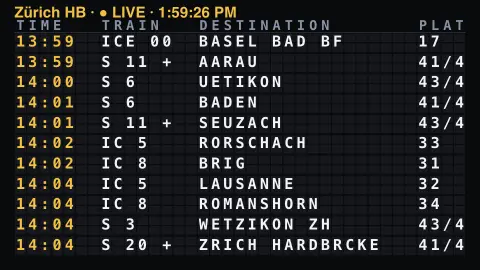
The Rail Board screensaver is a split-flap departures board of live Swiss railway trains leaving a station now — destination, line and platform — from the key-less Swiss public transport API. It's free, runs in your browser, and ESC exits.
Live preview
Press ESC to leave fullscreen. Settings are saved in your browser only.
How the Rail Board screensaver works
The saver fetches the live departure board for your chosen Swiss station from the country's key-less public transport API.
Each train becomes a row showing its departure time, line, destination and platform.
The characters flip on split-flap tiles, the classic mechanical station-board cascade, whenever the board changes.
As trains depart and new ones appear, the board clatters over to the updated schedule every minute.
Swiss timetables and the clockwork railway
Switzerland has a dense rail network, and it is known for the Taktfahrplan, a clock-face timetable in which trains on a route leave at the same minutes past every hour. Clock-face scheduling began on a commuter line near Bern in 1964 and was introduced across Switzerland in 1982. That regularity makes a departures board readable: the pattern of lines and destinations repeats.
This board uses an unofficial open API built on the national timetable and its real-time data, which are published as open data on opentransportdata.swiss. It aims to cover public transport within Switzerland, so a board for a big interchange can mix long-distance, regional and other services, each tagged with a category and line number.
Read a row from left to right: scheduled departure time, line, destination and platform. Categories such as IC (InterCity, domestic long-distance), IR (InterRegio, linking regions) and S (S-Bahn suburban and regional lines) describe the service. Platforms and times can change at short notice, and an API-built board can differ from the official display, so treat this as an atmospheric view of a station rather than a travel planner.
A worked example
For Zürich HB the board fills with rows like 18:06 IR 16 Bern Pl 14, the tiles riffling as each train rolls off the top and the next service flips into place — a real Swiss departures board on your screen.
Settings & tips
- Station chooses which Swiss station's departures to show.
- Flap speed sets how fast the tiles riffle.
- Header color recolours the board title.
Frequently asked questions
- Are the departures real?
- Yes. They come live from the Swiss public transport API, so the trains, times and platforms are the real upcoming departures.
- Does it need a key?
- No. The Swiss transport API is free and key-less; the saver only needs an internet connection.
- Which stations can I pick?
- Major Swiss stations including Zürich, Bern, Genève, Basel and Luzern.
- How is this different from the Departures Board?
- That board shows live aircraft; the Rail Board shows live Swiss trains with their lines and platforms.
- Is it free?
- Yes — free, no download, in your browser.
- What do codes like IC, IR or S mean?
- They are service categories: IC is an InterCity long-distance train, IR an InterRegio linking regions, and S-numbers are S-Bahn suburban or regional lines. The number identifies the route within that category.
- Why does a station show trains with such regular times?
- Swiss timetables use a clock-face pattern, so a route's trains leave at the same minutes each hour. Busy stations stack several of these patterns on top of each other.
- Can I use it to catch a train?
- It is built as a display, not a journey planner, and platforms or times can change at short notice. For a real trip, check the operator's official app or the station display.