Flight Delays Screensaver
The Flight Delays screensaver is a live operations board of delays and ground stops at major U.S. airports — who's running late and why — from the FAA's national airspace status, gathered by the pipeline. It's free, runs in your browser, and ESC exits.
Live preview
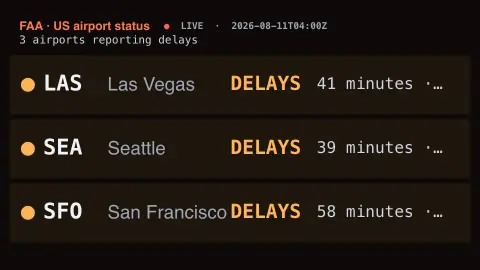
Press ESC to leave fullscreen. Settings are saved in your browser only.
How the Flight Delays screensaver works
A background pipeline reads the FAA's national airspace status — the live picture of delays, ground stops and closures across U.S. airports.
The saver lays it out as an operations board: each affected airport with its status, the average delay and the reason.
Ground stops and closures are flagged red, general delays amber, with the worst sorted to the top.
When the skies are clear it simply reports no major delays, and it refreshes every couple of minutes.
What the FAA status board reports
The Federal Aviation Administration runs the National Airspace System, and its Air Traffic Control System Command Center (ATCSCC) manages the traffic flow programs that appear on the public NAS Status page. Entries reflect operational decisions by traffic managers as well as the weather that prompted them.
The most common entries are general delays, ground delay programs, ground stops and closures. A ground delay program is a traffic management process that holds flights on the ground at their origin, with assigned departure times, when demand at a destination is expected to exceed what it can accept for an extended period; weather, especially low ceilings and visibility, is the usual trigger. A ground stop halts departures to an airport for a short period and may be used while a ground delay program is being put in place. For a program, the page lists a reason and an average delay.
A delay at one airport often has nothing to do with local conditions, since a storm at a distant hub can ripple through the schedule. The board covers airports within the United States; it does not show individual flight status, airline cancellations or airports in other countries.
A worked example
On a stormy afternoon the board lights up — BOS · Ground Delay · 48 min · low ceilings, DCA · Ground Stop · weather — while a calm day reads a quiet ✓ No major delays reported.
Settings & tips
- Accent recolours the board headings.
- Background sets the board backdrop.
- Run
automation/run.py delayson your pipeline machine to refresh the status.
Frequently asked questions
- Is the status real?
- Yes. It comes from the FAA's national airspace status, refreshed by the pipeline, so the delays and ground stops are the official ones.
- Why is the board sometimes empty?
- When no major airports are reporting delays the board says so — clear-weather days simply have little to show.
- Why does it use a pipeline?
- The FAA status feed isn't readable directly from a browser, so a small background script fetches it and saves a snapshot.
- Does it cover the whole world?
- No. The FAA covers United States airports, so the board is U.S.-focused.
- Is it free?
- Yes — free, no download, in your browser.
- What is the difference between a ground stop and a ground delay?
- A ground stop temporarily halts departures to an airport. A ground delay program instead holds flights at their origin with assigned departure times, so arrivals match what the destination can handle.
- Does an airport on the board mean my flight is late?
- Not necessarily. The status describes traffic management at an airport, while your flight depends on its aircraft, crew and routing. Check your airline for flight-level information.
- Why can delays persist after the weather clears?
- Aircraft and crews end up out of position and schedules back up, so recovery can take hours even when conditions at the airport have improved.