Shipping Lanes Screensaver
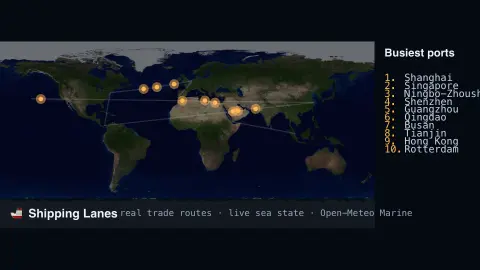
The Shipping Lanes screensaver animates container ships along the real great trade routes — Suez, Panama, Malacca and more — with their pace set by live sea conditions from the key-less Open-Meteo Marine API, alongside a real ranking of the world's busiest ports. It's free, runs in your browser, and ESC exits.
Live preview
Press ESC to leave fullscreen. Settings are saved in your browser only.
How the Shipping Lanes screensaver works
Ships travel along real named trade-route geometry connecting the world's major ports.
Live wave height along each route, from Open-Meteo Marine, subtly slows ships through rougher seas.
A side panel lists the world's busiest container ports by real throughput ranking.
This is a routes-and-conditions view, not individual live vessel tracking — see the FAQ for why.
The ocean highways of container trade
Container shipping concentrates on a handful of long trunk routes, such as Asia to Europe through the Suez Canal or around the Cape of Good Hope, and Asia to North America across the Pacific. Ships follow these lanes because they connect the big hub ports efficiently and pass through canals and straits such as Suez, Panama and Malacca.
Port volumes are conventionally counted in TEU, a twenty-foot equivalent unit based on the volume of a 20-foot container. A 40-foot container counts as two TEU, which allows ports handling different box sizes to be compared. Rankings can depend on how a port’s figure is defined and reported, for instance whether transhipment, where a box is moved from one ship to another at a hub, is counted.
The wave data matters because sea state affects speed and routing. The wave height shown comes from Open-Meteo’s Marine API, which combines wave forecast models from several weather services, so it is a model value for a point on the lane, not a measurement from a ship. The animated vessels illustrate flow along a route. They do not reveal where any one real ship is, when it will arrive, or what it carries.
A worked example
Watch the Suez route and the ships crossing it slow slightly whenever the live Red Sea wave height ticks up — a real ocean signal steering the animation, not a random wobble.
Settings & tips
- Show top-ports panel toggles the ranking list.
- Accent recolours the ship trails.
- Route geometry is real-world based; ship count is illustrative.
Frequently asked questions
- Are these real individual ships?
- No — live per-vessel tracking (AIS) requires a paid feed. This animates real trade routes with live sea conditions steering the pace, plus a real port-throughput ranking.
- Is a key needed?
- No. The sea-state data is free and key-less.
- Where do the port rankings come from?
- Published container-throughput figures for the world's largest ports, refreshed periodically.
- Is it free?
- Yes — free, no download, in your browser.
- What is a TEU?
- A twenty-foot equivalent unit, the standard way to count container traffic. A forty-foot container counts as two TEU, so ports and ships can be compared on one scale.
- Why do routes bend around some regions?
- Lanes follow canals, straits and designated corridors, and operators can choose other routes, such as around the Cape of Good Hope instead of through Suez. The drawn lanes are simplified geometry, not an exact track.
- Why are wave heights modelled rather than measured?
- Open-Meteo’s Marine API serves forecasts from global wave models run by weather services. That gives continuous coverage along a route, but values are forecasts for model grid points, so they carry some error.