Radar Sweep Screensaver
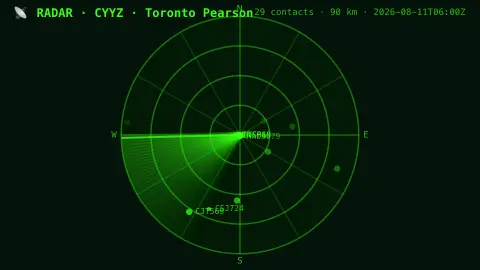
The Radar Sweep screensaver is a retro CRT radar where a glowing wedge sweeps the scope and live aircraft near the airport light up as blips, fading as the beam moves on. It's free, runs in your browser, and ESC exits.
Live preview
Press ESC to leave fullscreen. Settings are saved in your browser only.
How the Radar Sweep screensaver works
A background pipeline collects live aircraft positions near each airport from public flight data.
The saver plots them on a classic PPI radar scope: range rings, compass bearings, and a sweeping green wedge that rotates like an old air-traffic display.
Each aircraft glows brightest the instant the beam passes it, then fades until the next sweep — just like a phosphor radar screen.
Bright contacts are labelled with their callsign; pick any airport, defaulting to Toronto Pearson.
How a plan position indicator radar works
A plan position indicator, or PPI, is the classic circular radar display. The antenna sits at the centre and rotates through 360 degrees sending pulses, and a radial trace on the screen sweeps in step with it. Echoes are plotted by direction and distance from the radar site. Distance comes from timing, because radio waves travel at the speed of light, so the delay between pulse and echo gives the range.
Concentric rings mark distance from the centre, and compass markings give the bearing. The fading blips echo early display tubes that kept an image visible for a short time after the beam passed, which air traffic controllers used before data was digitised and held in memory.
Modern surveillance also uses ADS-B, where an aircraft works out its own position, usually by satellite navigation, and broadcasts it with its identification, altitude and velocity about once a second. Volunteer receivers collect those broadcasts into crowd-sourced networks, so coverage varies, and aircraft without ADS-B are not shown. A scope like this depicts aircraft positions in a radar style but is not an actual radar picture and must not be used for navigation or safety.
A worked example
Around Toronto Pearson the wedge sweeps and a dozen contacts flare to life — ACA123, WJA456 — each blip blooming as the beam crosses its bearing, then dimming to a ghost until the next pass.
Settings & tips
- Airport chooses the scope's centre, defaulting to Toronto Pearson.
- Sweep speed sets how fast the radar beam rotates.
- Run
automation/run.py aircrafton your pipeline machine to refresh the contacts.
Frequently asked questions
- Are the aircraft real?
- Yes. Their positions come from public flight data gathered by the pipeline, refreshed every few minutes.
- Why does it use a pipeline?
- The flight source is locked to its own site in the browser, so a small background script reads it and saves a snapshot.
- Why do blips fade?
- Like a real radar, each contact only refreshes when the rotating beam sweeps past it, then dims until the next pass.
- Which airports are included?
- Toronto Pearson plus major hubs like New York JFK, London Heathrow, Frankfurt, Tokyo and Dubai.
- Is it free?
- Yes — free, no download, in your browser.
- How does radar measure distance?
- By timing the echo. Radio waves travel at the speed of light, so the round-trip delay between a pulse and its reflection tells you how far away the object is.
- What is ADS-B?
- Automatic Dependent Surveillance-Broadcast is a system in which an aircraft determines its own position, usually by satellite navigation, and periodically broadcasts it with its identification, altitude and velocity. Anyone with a suitable receiver can pick the signals up.
- Why do some aircraft not appear?
- Aircraft without ADS-B are not shown, and signal range and receiver coverage limit what a network can pick up.