Kernel CVEs Screensaver
The Kernel CVEs screensaver shows CVE assignments announced by the Linux kernel’s own numbering authority, key-less. It’s free, runs in your browser, and ESC exits.
Live preview
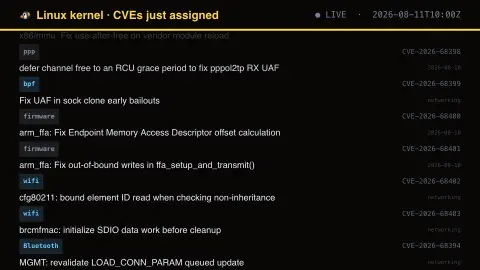
Press ESC to leave fullscreen. Settings are saved in your browser only.
How the Kernel CVEs screensaver works
The saver reads the source described above and draws it on a canvas — no account, no tracking.
CVE assignments announced by the Linux kernel’s own numbering authority, key-less. The kernel assigns one to nearly every fix that could conceivably be security-relevant, so read the subsystem prefix rather than the volume.
It refreshes on a schedule, so what you see stays current.
Colours and any options can be changed in settings; nothing is stored beyond your own browser.
Why the kernel assigns so many CVEs
In February 2024 the Linux kernel project became its own CVE Numbering Authority (CNA), taking over assigning vulnerability identifiers for kernel code. Its documented approach is deliberately broad: the kernel CVE team assigns a CVE to bug fixes it identifies as having possible security implications, and assignment happens automatically only after a fix is available and applied to a stable kernel tree.
The result is a high volume of identifiers compared with the old practice of waiting for a researcher's report. The kernel CNA team has argued that judging severity generically is infeasible, because the kernel is so configurable that a bug unreachable on one system may be easy to exploit on another. A CVE here therefore says a fix exists, not how dangerous the original bug was. No CVEs are assigned for versions of the kernel that are no longer actively supported, and only the relevant maintainers can dispute or modify an assigned CVE.
The most useful part of each line is usually the subsystem named at the start of the summary, such as bpf, net, sched or a particular driver, because it shows which area of the tree was patched. Treat the identifier as a pointer to a fix, and check whether the code in question is even built into the kernel you run.
A worked example
CVE assignments announced by the Linux kernel’s own numbering authority, key-less. The kernel assigns one to nearly every fix that could conceivably be security-relevant, so read the subsystem prefix rather than the volume.
Settings & tips
- Accent and Background recolour the display.
- Every value on screen comes from the live source — nothing is simulated.
- Press ESC to leave fullscreen.
Frequently asked questions
- Is this real data?
- Yes — it comes from the source named on this page and is refreshed on a schedule.
- Is a key needed?
- No. This source is fully key-less.
- Is it free?
- Yes, and it runs entirely in your browser.
- Does a kernel CVE mean my machine is at risk?
- Not by itself. The bug may sit in a driver or feature you do not use, or may already be patched in your distribution's kernel.
- Why are there so many kernel CVEs?
- The kernel CVE team treats security bugs as ordinary bugs and assigns a CVE to fixes with possible security implications, rather than trying to decide which ones are exploitable. Assignment follows once the fix is in a stable tree.
- What is a subsystem prefix?
- It is the part of the kernel being changed, for example networking, scheduling or a given driver, and usually appears at the start of the fix's title.