Distro Security Advisories Screensaver
The Distro Security Advisories screensaver shows real Debian DSA and Ubuntu USN security advisories, interleaved newest-first so neither distribution dominates the feed, gathered key-less by the background pipeline. It's free, runs in your browser, and ESC exits.
Live preview
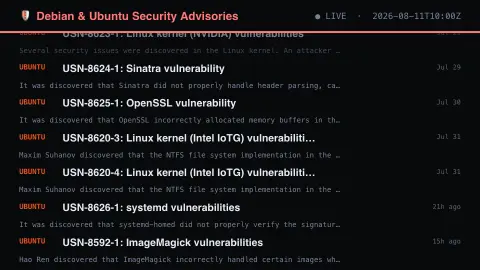
Press ESC to leave fullscreen. Settings are saved in your browser only.
How the Distro Security Advisories screensaver works
The background pipeline reads this from Debian & Ubuntu and saves a snapshot the saver loads.
Real Debian DSA and Ubuntu USN security advisories, interleaved newest-first so neither distribution dominates the feed, gathered key-less by the background pipeline..
It refreshes on a schedule, so what you see stays current.
Colours and the accent can be changed in settings; nothing is stored beyond your own browser.
How Debian and Ubuntu announce fixes
Linux distributions package thousands of open-source programs, and when a security flaw is fixed in one, the distribution publishes an advisory. Debian numbers its notices as DSA, for Debian Security Advisory, and posts them to the debian-security-announce list; Ubuntu issues Ubuntu Security Notices, USN, when its developers fix a security issue in an official package. Both give each notice a number followed by a suffix such as -1.
A Ubuntu notice lists the affected releases and links the CVE identifiers it addresses, abbreviating long lists with a count of further items. Debian entries pair the number with a package name, and later suffixes such as -2 typically mark follow-up updates, for example a regression update. Debian's Long Term Support updates use a separate DLA series.
Advisories are published once a fix is available, so the date reflects the patch rather than the discovery. The text summarises the issue and the affected versions, but the board does not rank severity or say whether a given system is exposed. Whether any item applies depends on the installed packages and release, and the distribution's own tools and notes are the place to check.
A worked example
Real Debian DSA and Ubuntu USN security advisories, interleaved newest-first so neither distribution dominates the feed, gathered key-less by the background pipeline.
Settings & tips
- Accent and Background recolour the display.
- Run
automation/run.py distrosecurityto refresh the feed. - Press ESC to leave fullscreen.
Frequently asked questions
- Is this real data?
- Yes — it comes from Debian & Ubuntu and is refreshed on a schedule.
- Is a key needed?
- No. This source is fully key-less.
- Does it need an internet connection?
- Yes — it reads a live source, so it needs a connection to update.
- Is it free?
- Yes — free, no download, in your browser.
- What is the difference between a DSA and a USN?
- They are the same kind of document from two projects: DSA is Debian's advisory numbering and USN is Ubuntu's.
- What does a USN contain?
- A title, date, short summary, the list of affected Ubuntu releases and linked CVE identifiers for the vulnerabilities addressed.