Vendor-Rated CVEs Screensaver
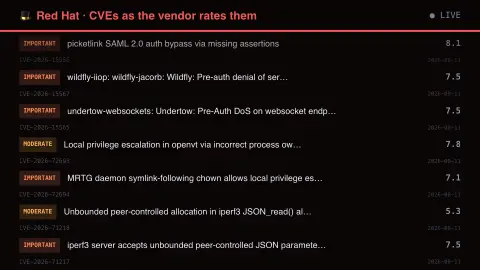
The Vendor-Rated CVEs screensaver shows CVEs re-rated by Red Hat against how the code is actually built and shipped in Enterprise Linux, key-less. It’s free, runs in your browser, and ESC exits.
Live preview
Press ESC to leave fullscreen. Settings are saved in your browser only.
How the Vendor-Rated CVEs screensaver works
The saver reads the source described above and draws it on a canvas — no account, no tracking.
CVEs re-rated by Red Hat against how the code is actually built and shipped in Enterprise Linux, key-less. Its ratings often disagree with the upstream CVSS, because a flaw in a feature Red Hat compiles out is not the same flaw on their platform. That disagreement is the point.
It refreshes on a schedule, so what you see stays current.
Colours and any options can be changed in settings; nothing is stored beyond your own browser.
Why Red Hat rates CVEs itself
A CVE is an identifier for a publicly known security flaw, and the usual severity measure attached to it is the CVSS score, which rates the flaw's constant characteristics such as attack vector, complexity and impact. Red Hat publishes its own assessments for its products, because a CVSS base score does not account for how software is deployed. Red Hat says its scores can differ from those on the National Vulnerability Database since they reflect how each product ships and uses the software.
Red Hat rates flaws on a four-level scale of Low, Moderate, Important and Critical, shown alongside a CVSS base score, and says it does not rely solely on CVSS to set severity or fix priority. Critical is for flaws a remote, unauthenticated attacker could easily exploit for code execution without user interaction; Moderate covers flaws that are harder to exploit or affect unlikely configurations. Severity can be adjusted when a default-enabled technology blocks or reduces the risk, and a rating does not rise just because an exploit is later released.
This display lists records as published, so a listing does not mean your system is vulnerable. Whether you are affected depends on the packages installed, their versions and configuration. This is general information and not security advice; the vendor's own advisories are the place to check specific systems.
A worked example
CVEs re-rated by Red Hat against how the code is actually built and shipped in Enterprise Linux, key-less. Its ratings often disagree with the upstream CVSS, because a flaw in a feature Red Hat compiles out is not the same flaw on their platform. That disagreement is the point.
Settings & tips
- Accent and Background recolour the display.
- Every value on screen comes from the live source — nothing is simulated.
- Press ESC to leave fullscreen.
Frequently asked questions
- Is this real data?
- Yes — it comes from the source named on this page and is refreshed on a schedule.
- Is a key needed?
- No. This source is fully key-less.
- Is it free?
- Yes, and it runs entirely in your browser.
- Why can Red Hat's rating differ from the CVSS score?
- A CVSS base score describes constant characteristics of a flaw and ignores deployment. Red Hat's rating reflects its technical analysis and how its products ship and use the software, so the two can disagree.
- What are the four severity levels?
- Red Hat classifies flaws as Low, Moderate, Important or Critical, based on the flaw's impact and how easily it can be exploited.
- Does a CVE listed here mean my machine is at risk?
- Not necessarily. Exposure depends on which packages and versions you run and how they are configured, and the vendor's advisory covers the details.