Every Genome UCSC Hosts Screensaver
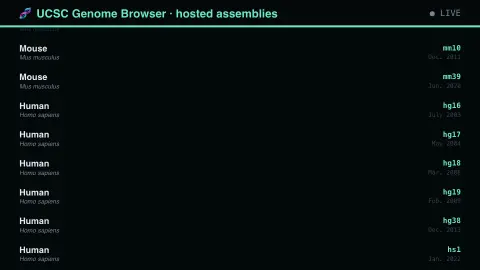
The Every Genome UCSC Hosts screensaver lists the genome assemblies carried by the UCSC Genome Browser — a couple of hundred of them — with organism, scientific name, assembly identifier and release. The list is a compressed history of sequencing effort. It runs in the browser with nothing to install; press ESC to exit.
Live preview
Press ESC to leave fullscreen. Settings are saved in your browser only.
How the Every Genome UCSC Hosts screensaver works
The saver reads The UCSC Genome Browser's public API.
No account and no key: the request goes straight from your browser, or from this site's own refreshed copy of the feed where the source does not allow browser access.
Values are drawn on a canvas that resizes with the window, so it works on a laptop or a wall display.
If the source is unreachable the saver says so on screen rather than showing stale numbers as though they were current.
Genome assemblies and the UCSC Browser
The UCSC Genome Browser, run by the University of California, Santa Cruz, is a widely used tool for viewing DNA sequence alongside annotations. It hosts well over 200 genome assemblies, and an assembly is one version of a reconstructed genome. UCSC identifiers follow the reference consortia’s builds: hg38 is the December 2013 human assembly (GRCh38), hg19 is the February 2009 one (GRCh37), and mm10 is the December 2011 mouse assembly (GRCm38).
Sequencers read only short fragments of DNA, so an assembly is a computational reconstruction, put together from many overlapping reads and then ordered into larger pieces. Later versions of a genome correct errors and add data, but coordinates are tied to one version, so a position in hg19 is not the same place in hg38. That is why older builds such as hg19 remain in everyday use for legacy datasets and clinical annotations.
The catalogue therefore mixes current and superseded builds. The list says what is hosted, not which genome is the best or most current for a species, and the dates attached are assembly release dates, not the date a species was first sequenced.
A worked example
Each row names an organism in plain and scientific form, with its assembly id and release date. Human and mouse have many versions because the reference kept being corrected; most species have exactly one, from the year somebody finally funded the work. An assembly labelled 2009 that was never superseded means nobody has revisited that organism in fifteen years.
Settings & tips
- Accent and Background recolour the display without changing the data.
- Add it to a Multi-view grid to watch it alongside other live savers.
- Press ESC at any time to leave fullscreen.
Frequently asked questions
- What is a genome assembly?
- The reconstructed sequence of an organism's genome, stitched together from many short reads. Each new assembly corrects errors and fills gaps, which is why the important species have several.
- Why are they ordered like that?
- By UCSC's own display ranking, which puts the organisms researchers actually browse first. Sorted alphabetically it would open on the aardvark and bury human and mouse in the middle.
- Is this real data?
- Yes. It comes from The UCSC Genome Browser's public API. Nothing is invented or simulated, and if the source cannot be reached the saver reports that instead of drawing something plausible.
- Does it cost anything or need an account?
- No. Every screensaver here is free, runs in the browser and needs no sign-up. This one uses a public API that requires no key.
- What does hg19 versus hg38 mean?
- They are successive UCSC builds of the human reference genome: hg19 corresponds to GRCh37 (February 2009) and hg38 to GRCh38 (December 2013). Coordinates are not interchangeable between them.
- Why is hg19 still used?
- UCSC’s glossary notes that hg19 is still widely used for legacy datasets and clinical annotations, so older builds remain relevant.
- Is an assembly the same as a gene list?
- No. An assembly is the sequence itself, arranged into chromosomes or scaffolds. Genes are annotations layered onto that sequence afterwards.