FDA Drug Safety Reports Screensaver
The FDA Drug Safety Reports screensaver streams real FDA drug adverse-event safety reports as they're reported. It is free, runs in your browser, and ESC exits.
Live preview
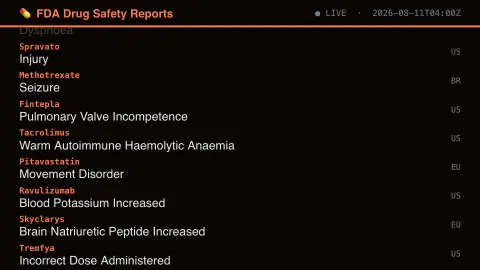
Press ESC to leave fullscreen. Settings are saved in your browser only.
How the FDA Drug Safety Reports screensaver works
The background pipeline polls the FDA's own openFDA API — the FDA's public adverse-event database — every few minutes for new records.
Each new item eases up into its slot at the bottom of the list as it arrives.
A header shows a live/connecting indicator and the last update time.
No key is required for this key-less public endpoint.
What adverse-event reports can and cannot show
The FDA collects drug safety reports in the FDA Adverse Event Reporting System, known as FAERS. Reporting in the United States is voluntary for clinicians and consumers, who can send reports to the FDA directly or to a manufacturer; a manufacturer that receives a report is normally required to forward it to the FDA. The agency exposes the data through openFDA, which is what this saver reads. Each record names the drugs involved, the patient’s reactions and whether the case was flagged as serious.
Reaction names are standardised medical terms from the MedDRA vocabulary. Because FAERS also covers medication errors, an entry such as Incorrect Dose Administered can describe how a product was used rather than a reaction caused by the drug itself.
The key caveat, stated by the FDA, is that a causal relationship cannot be established from a report: it records that an event was reported, not that the drug caused it. When a report lists several drugs and reactions, the data cannot show which drug caused which reaction. Under-reporting and publicity affect what gets reported, and commonly used products can show more events simply because more people use them, so counts cannot be used to estimate incidence or compare how safe two drugs are. This screensaver is for curiosity and not medical advice; consult a pharmacist or doctor about any medicine.
A worked example
A real recent item scrolls into view with its details, then eases upward as newer ones arrive behind it.
Settings & tips
- Each report is a real, individually-filed adverse-event submission.
- Accent recolours the header and highlights.
- This is a public safety-monitoring feed, not medical advice.
Frequently asked questions
- Is this real data?
- Yes — it's read live from the FDA's own openFDA API, the FDA's public adverse-event database.
- Is a key needed?
- No. This is a fully key-less public API.
- How often does it refresh?
- The pipeline polls for new records every few minutes.
- Is it free?
- Yes — free, no download, in your browser.
- Does a report mean the drug caused the reaction?
- No. The FDA states that a causal relationship cannot be established from a report. It records that an event was reported while a drug was involved, and separate investigation is needed to assess cause.
- What does the serious flag mean?
- openFDA records a serious field for each report, along with separate fields for outcomes such as death and hospitalization. It reflects what was reported about the case, not a verified medical judgement.
- Why do some drugs appear more than others?
- Common products can show more events simply because more people use them, and under-reporting and publicity also affect which events get reported, so frequency is not a measure of risk.