Position In The Range Screensaver
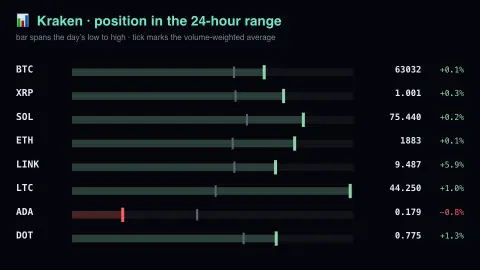
The Position In The Range screensaver draws each cryptocurrency pair as a bar spanning the last 24 hours' low to high, with a marker showing where the price currently sits and a tick for the volume-weighted average. A pair pinned to the right is at its daily high; one at the left has given the day back. It runs in the browser with nothing to install; press ESC to exit.
Live preview
Press ESC to leave fullscreen. Settings are saved in your browser only.
How the Position In The Range screensaver works
The saver reads Kraken's public ticker endpoint, key-free.
No account and no key: the request goes straight from your browser, or from this site's own refreshed copy of the feed where the source does not allow browser access.
Values are drawn on a canvas that resizes with the window, so it works on a laptop or a wall display.
If the source is unreachable the saver says so on screen rather than showing stale numbers as though they were current.
Reading a day's range on a crypto exchange
Kraken is a cryptocurrency exchange, and its public ticker endpoint returns a summary for each trading pair: ask, bid, last trade, volume, volume-weighted average price, number of trades, and the low and high prices, plus the day’s opening price. Most of these fields come in two versions, one for today (since midnight UTC) and one for the last 24 hours, so it matters which window is shown.
A position-in-range bar places the current price between the low and high of a window. The stochastic oscillator, developed by George Lane in the late 1950s, works on the same idea: it expresses the latest close as a percentage of the range between the lowest and highest prices over a number of periods. Near the high means the price is at the top of what has recently traded; near the low means the bottom. It describes the past window and carries no information about what happens next.
Several things can make a bar look misleading. A pair that moved little may have a very narrow range, so a tiny change slides the marker across the whole bar. Prices differ between exchanges, so Kraken’s range is Kraken’s own, not a global figure. Nothing here is a recommendation to buy or sell anything.
A worked example
Each row is a range bar with the ticker on the left and the price and daily change on the right. The bright marker is the last trade; the grey tick behind it is the volume-weighted average — the price at which the day's volume actually changed hands, which is a more honest average than the midpoint of two extremes. Pairs are ordered by trade count, so the busiest markets lead.
Settings & tips
- Accent and Background recolour the display without changing the data.
- Add it to a Multi-view grid to watch it alongside other live savers.
- Press ESC at any time to leave fullscreen.
Frequently asked questions
- What is VWAP?
- Volume-weighted average price: every trade weighted by its size. It tells you where the day's real activity happened, rather than the midpoint between a single spike high and a single spike low.
- Why is the last price sometimes outside the middle?
- Because the bar spans the whole day. A price hard against either end means the market is making a new high or low for the session right now.
- Is this real data?
- Yes. It comes from Kraken's public ticker endpoint, key-free. Nothing is invented or simulated, and if the source cannot be reached the saver reports that instead of drawing something plausible.
- Does it cost anything or need an account?
- No. Every screensaver here is free, runs in the browser and needs no sign-up. This one uses a public API that requires no key.
- Does the range include every trade on the pair?
- It covers trading on Kraken only. Other exchanges list the same pair at slightly different prices, so highs and lows will not match across venues.
- Why does a narrow bar jump around so much?
- When the high and low are close together, even a small price move is a large fraction of the range, so the marker travels a long way.
- Is a marker near the high a sign that price will keep rising?
- No. It records where the price sits within what has already happened and does not predict direction.