Coral Contours Screensaver
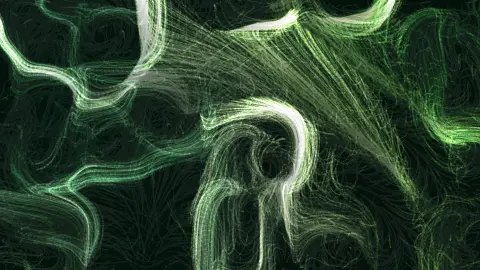
Coral Contours is a free, in-browser screensaver that runs a Gray–Scott reaction-diffusion simulation on a hidden grid and lets thousands of particles trace its contour lines. The chemical pattern grows outward from seeded spots into coral-like blobs and stripes, and because the particles ride its edges, the picture is the pattern drawing itself as it spreads. Nothing to download, and ESC exits at any time.
Live preview
Press ESC to leave fullscreen. Settings are saved in your browser only.
How the Coral Contours screensaver works
The Gray–Scott model is two virtual chemicals on a grid. U is fed in everywhere, V eats U to make more of itself, and both diffuse at different rates. That simple recipe grows the spots, stripes and labyrinths seen on animal coats and in real chemical dishes — the patterns Alan Turing predicted in 1952.
The simulation runs on a 148-cell-wide grid, two iterations per frame, seeded with a dozen or so small islands of V and a feed and kill rate chosen from the coral-growing part of the parameter space. On its own you would never see it: the grid is never drawn.
Instead, each particle looks up the gradient of V under it and moves at right angles to it — along the contour lines. So particles gather on the edges of every blob and stripe and trace them, and as the pattern grows the traced edges advance with it. Where the field is flat, they fall back to simplex noise so nothing stalls.
The growth rate is tied to Evolve; at zero the chemistry stops and the particles keep circling whatever shape it had reached. Long trails suit this field because the edges only read as coral once a few laps have been drawn.
Turing's morphogenesis and the Gray-Scott model
In 1952 Alan Turing published The Chemical Basis of Morphogenesis, proposing that interacting chemicals spreading at different speeds could spontaneously form patterns from a nearly uniform start. In the activator-inhibitor picture, one chemical promotes itself while another spreads faster and suppresses it at a distance, and the competition sets up spots, stripes and labyrinths. Reaction-diffusion processes have since been argued to be involved in animal coats and skin pigmentation, though how widely the idea applies remains debated.
The Gray-Scott model takes its name from Peter Gray and Stephen Scott, whose 1980s papers studied the autocatalytic reaction A + 2B giving 3B in a stirred tank reactor. Two chemicals, U and V, each diffuse at their own rate, and two parameters control the behaviour: a feed rate, which sets how fast U is supplied and how fast material is drained, and a kill rate, which sets how quickly V is converted away. Changing them yields a gallery of patterns, including spots that divide like cells, wandering bubbles and colliding waves. John Pearson's 1993 Science article, Complex Patterns in a Simple System, is the standard reference for exploring this parameter space.
The key point is that the pattern comes from the rule, not from any template. Different seeds produce different but recognisably related designs. Here the simulation is hidden and used as an invisible guide for moving particles.
A worked example
At the defaults — Chlorophyll palette, 2400 particles, Speed 0.9, Trail 70 — a dozen green islands appear, thicken, and sprout lobes that branch and bud like a coral head, with the particles sketching every lobe’s outline as it forms. Leave it for a few minutes and the islands merge into a labyrinth that fills the screen. Reseed and a different feed rate gives spots instead of stripes.
Settings & tips
- Be patient: the coral takes a minute or two to grow from spots into branches.
- Trail 100 keeps every stage of the growth visible at once, like a time-lapse in a single frame.
- Sakura and Ultraviolet turn the coral into something closer to a slide under a microscope.
Frequently asked questions
- How is this different from the Reaction-Diffusion Patterns screensaver?
- That saver paints the chemical concentrations directly as an image. This one never shows the grid; it uses the same kind of simulation only as a flow field, and what you see is particles tracing its contour lines, so the pattern is drawn by its edges instead of filled in.
- Is the Coral Contours screensaver free?
- Yes. It runs free in your browser with nothing to download or install, and it works offline once the page has loaded.
- What does the Seed setting do?
- Everything is deterministic from the seed: the noise table, where the field’s features land and the order particles spawn in. Leave it blank for a fresh random layout on every run, or type any short word or number to get the same layout back each time.
- Why does the image ripple when I move the mouse?
- The cursor and a lagging echo of it act as two wave sources. Their interference pattern nudges nearby particles onto the bright fringes and dims the dark ones, so the flow visibly reacts to you. Turn off Cursor ripples in the settings if you want the field left alone.
- How do I exit the Coral Contours screensaver?
- Press the ESC key at any time to leave fullscreen and return to the page.
- What are the feed and kill rates?
- In the Gray-Scott model the feed rate sets how fast chemical U is supplied (and how fast material is drained), and the kill rate sets how quickly V is converted away. Their balance determines the pattern type.
- Did Turing's idea turn out right?
- Reaction-diffusion mechanisms have been argued to be involved in animal coats and skin pigmentation, but the evidence varies from case to case.
- Why do patterns differ each time?
- The outcome depends on the initial conditions, so different seeds give different details while keeping a common character.